Understand the graphics processor (GPU)
Understand the graphics processor (GPU)
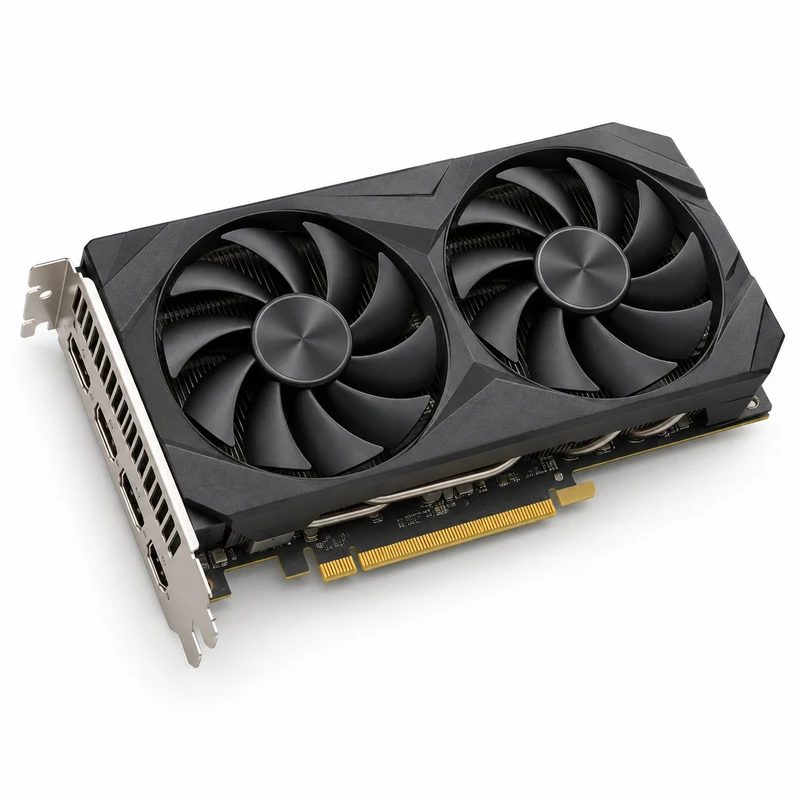
You are going to identify parts in the numbered pictures, explore six illustrated topics, then answer three short questions about what you have learned.
You will understand the GPU’s job and why a computer can have graphics without a large separate card.
GPU means graphics processing unit. It is a processor especially suited to doing many similar calculations at once. One important use is preparing the pictures that a computer sends to a screen.
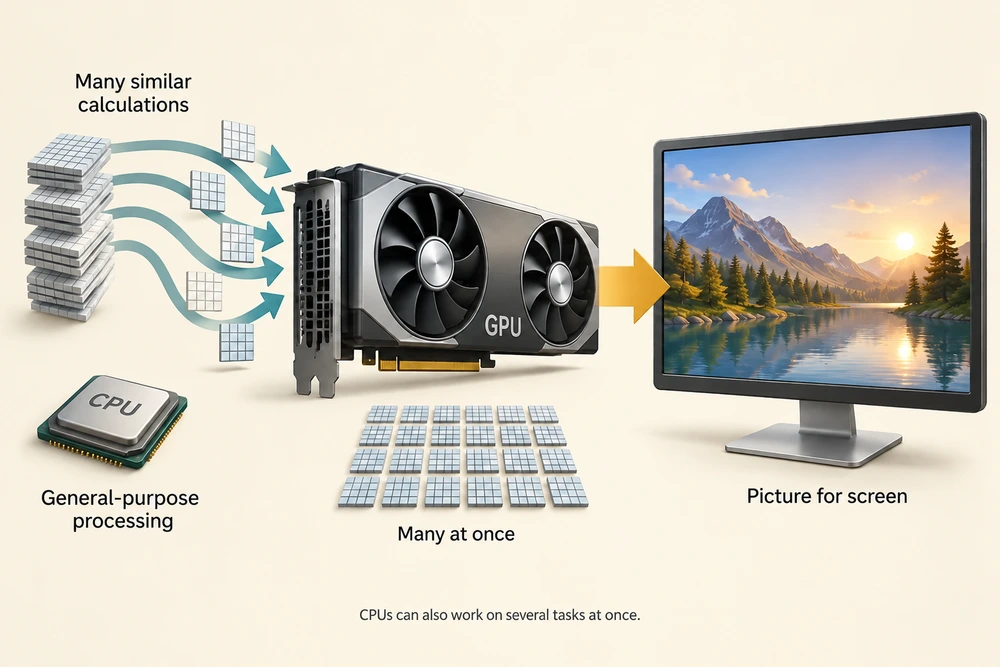
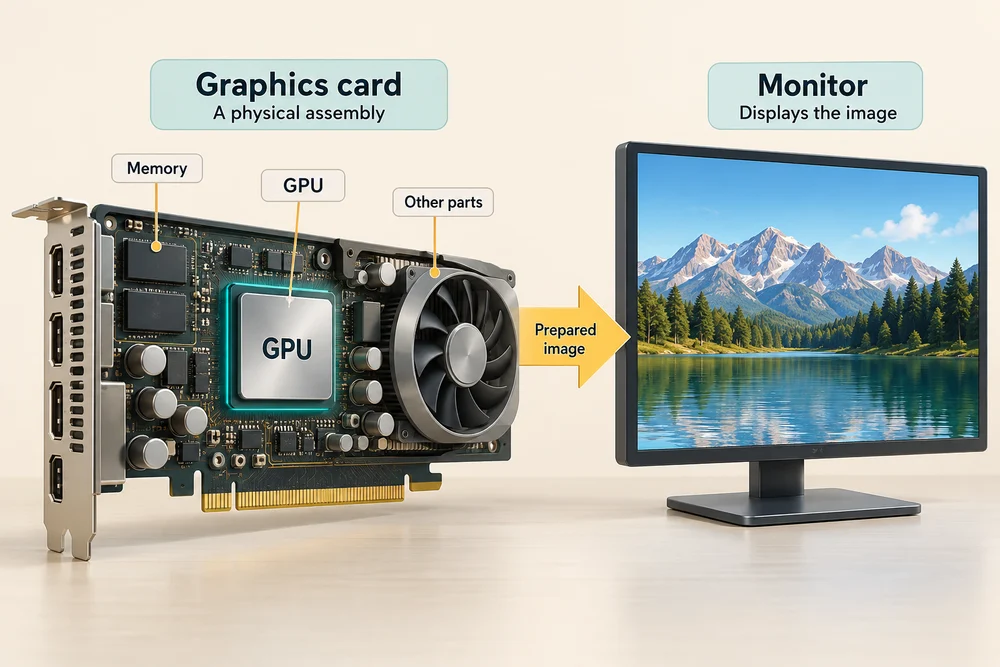
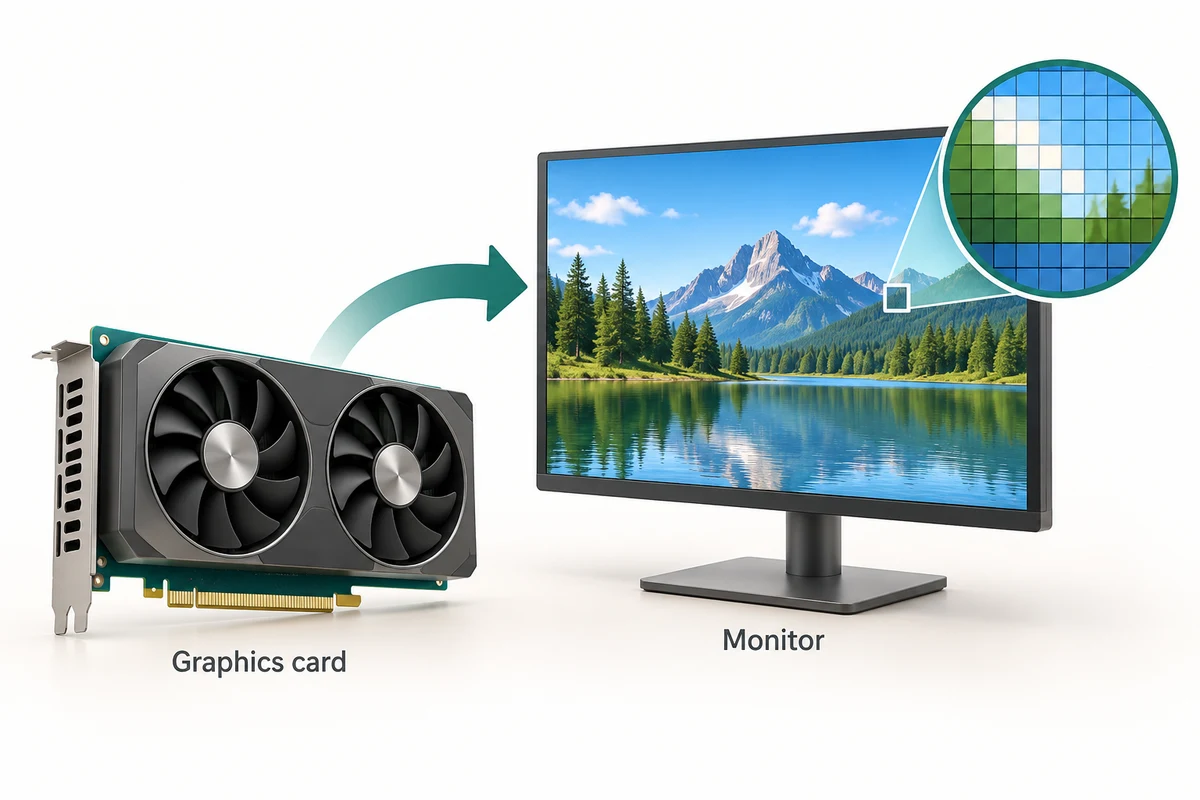
The GPU and the monitor do different jobs. Graphics processing prepares the image; the monitor displays it. A graphics card is a physical assembly that includes a GPU and other supporting parts, so the words GPU and graphics card are related but not exactly the same.
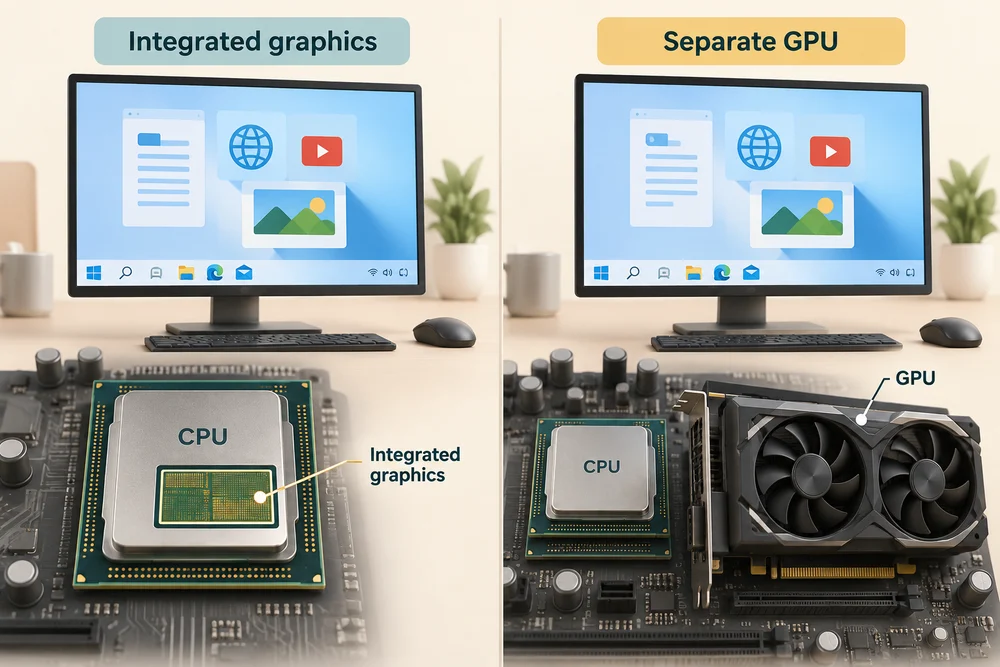
Some computers have integrated graphics built into their processor package. Others also have a separate GPU. Both arrangements can support everyday tasks, depending on the computer and the work.
Explore how it works
Explore the numbered parts first. Click or tap a spot, or choose its named button, then click Read explanation to move to its description. The six topic cards further down explain the wider ideas. Click a card once to read more, then Back to the pictures to return. With a keyboard, press Tab to reach a button and Enter to activate it. Explore at your own pace.
Look inside a graphics card
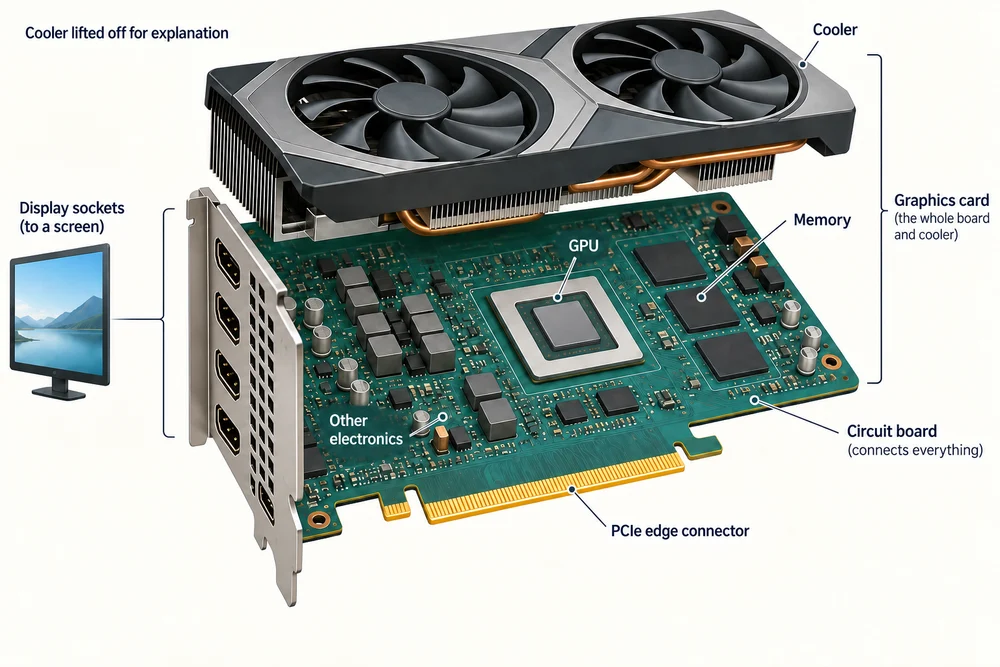
The cooling assembly is lifted to reveal the board. A graphics card contains more than the GPU chip. Exact layouts vary.
Cooling assembly
A heatsink carries heat away from the chips and the fans move air through it. This assembly often hides most of the circuit board in a finished graphics card.
GPU chip
The graphics processing unit performs calculations used to prepare pictures and other suitable work. This chip is one part of the complete graphics card, not the entire board.
Graphics memory
These memory chips hold information currently needed by the GPU, such as textures and image data. They are working memory, not a place where your personal files stay when the computer is off.
Motherboard connector
The gold contacts fit a compatible PCIe expansion slot. This connection carries data between the card and the rest of the computer. Many cards also need an additional power connection.
Preparing the picture
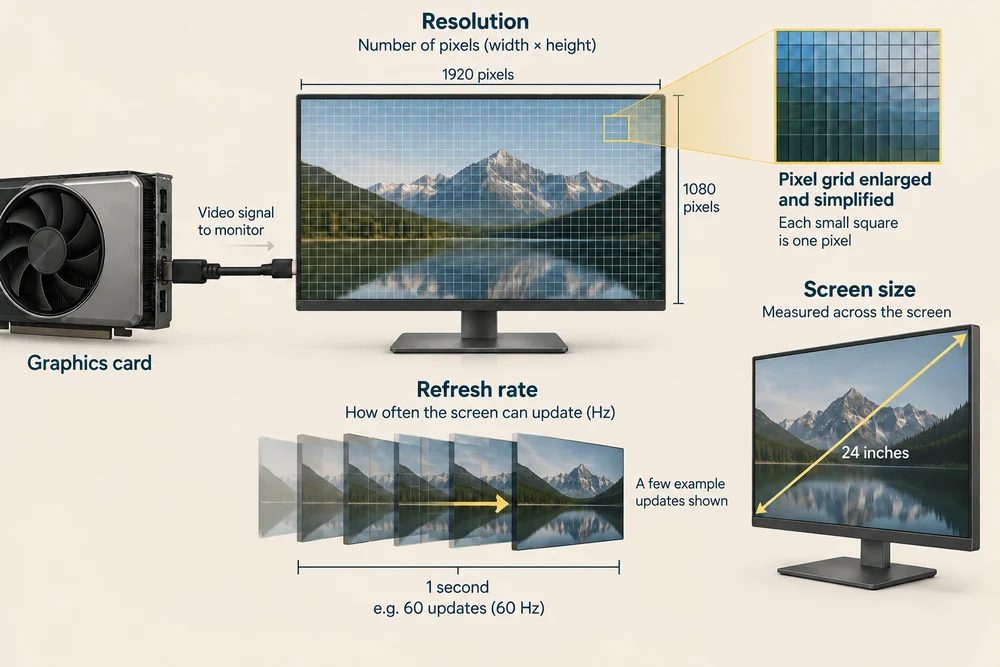
Images on a screen are made from tiny picture elements called pixels. Graphics processing helps work out the colours and positions needed to display windows, photographs, video and three-dimensional scenes.
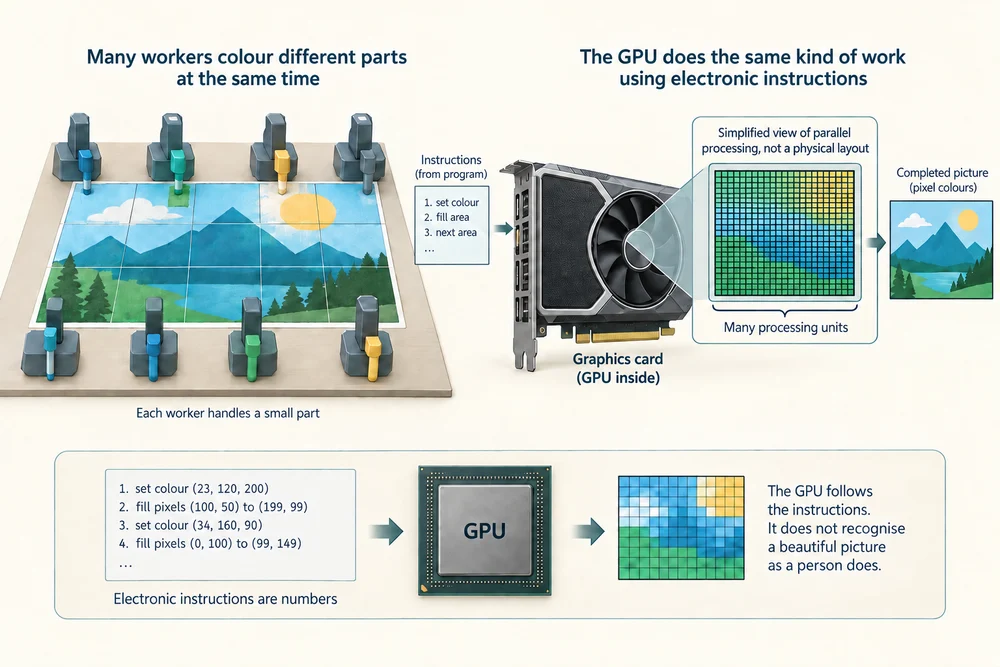
Imagine many workers colouring different parts of a picture at the same time. That helps explain the GPU’s strength in similar calculations, but the real GPU follows electronic instructions. It does not recognise a beautiful picture as a person does.
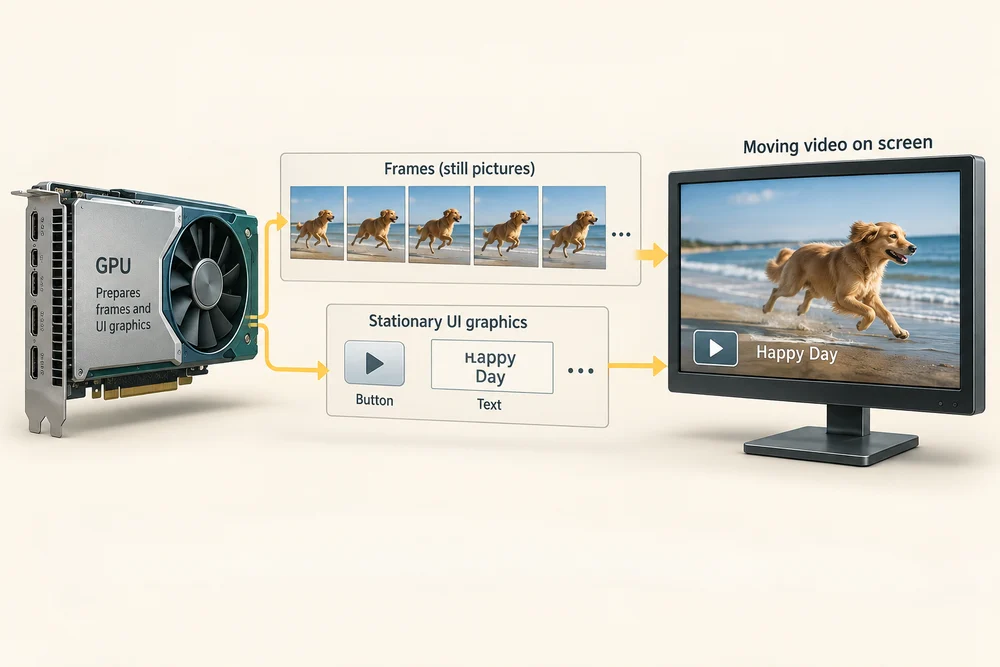
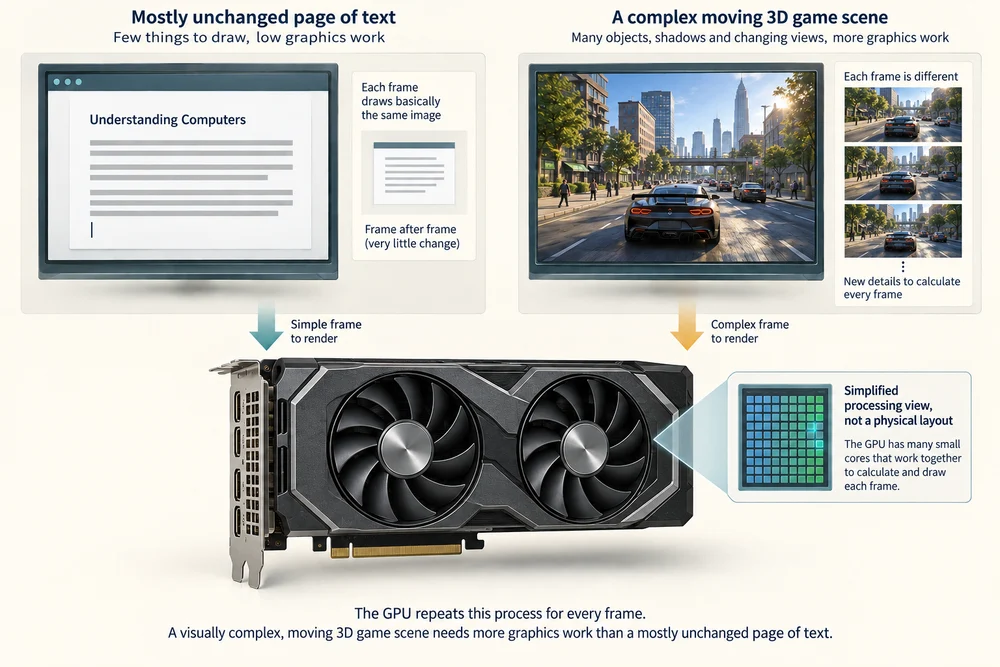
A moving video is a sequence of still pictures shown one after another. Each picture is called a frame. Graphics work helps prepare the changing frames as well as the stationary buttons and text around them.
Integrated graphics
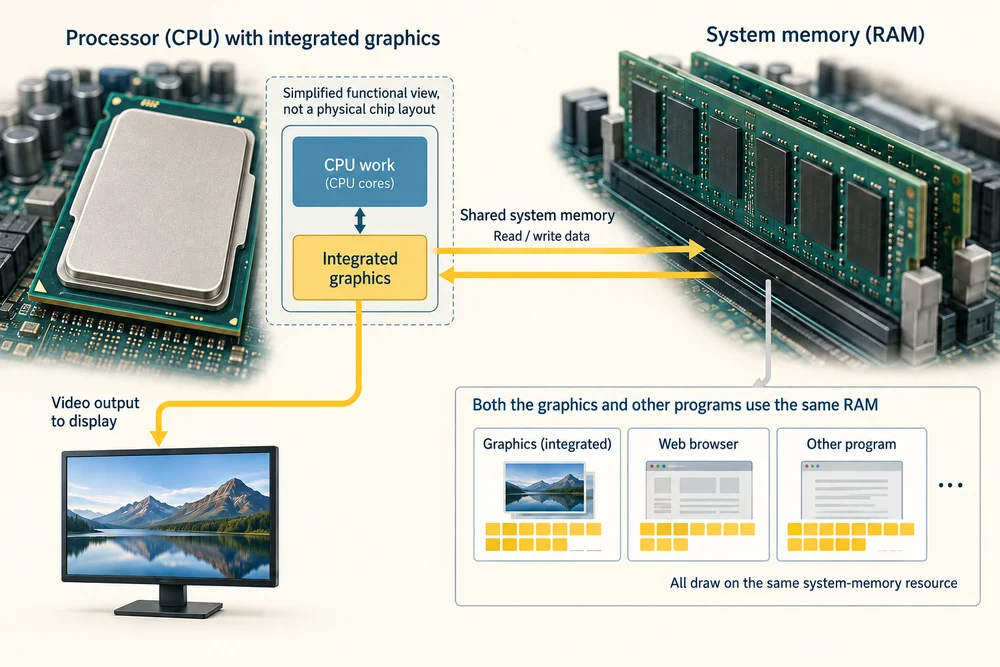
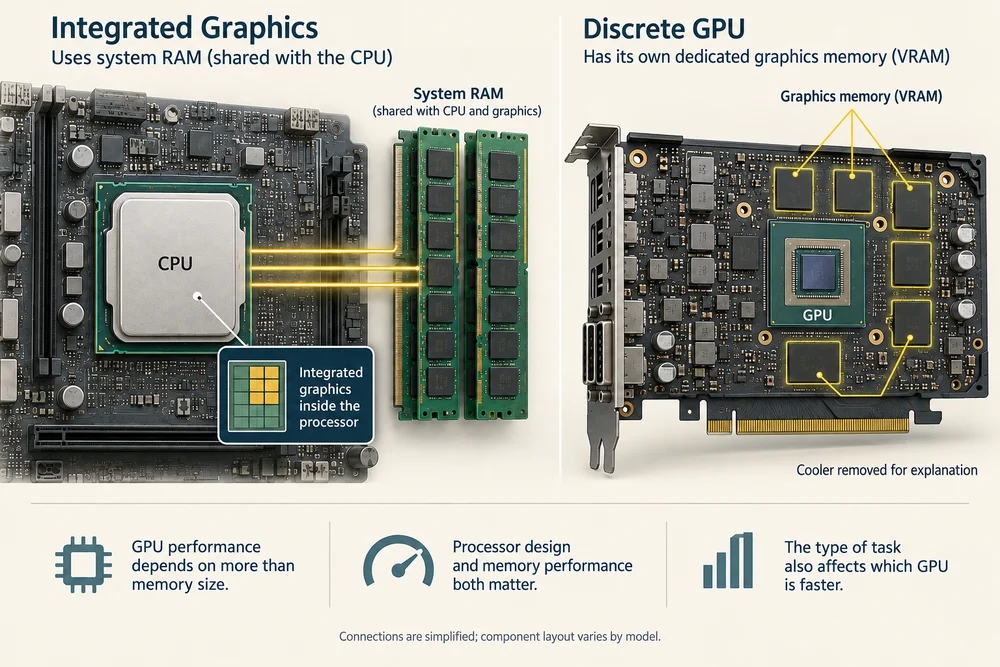
Integrated graphics are built into the processor package rather than supplied as a separate desktop card. They commonly share the computer’s system RAM with other tasks. This arrangement can save space and power, which is useful in compact computers.
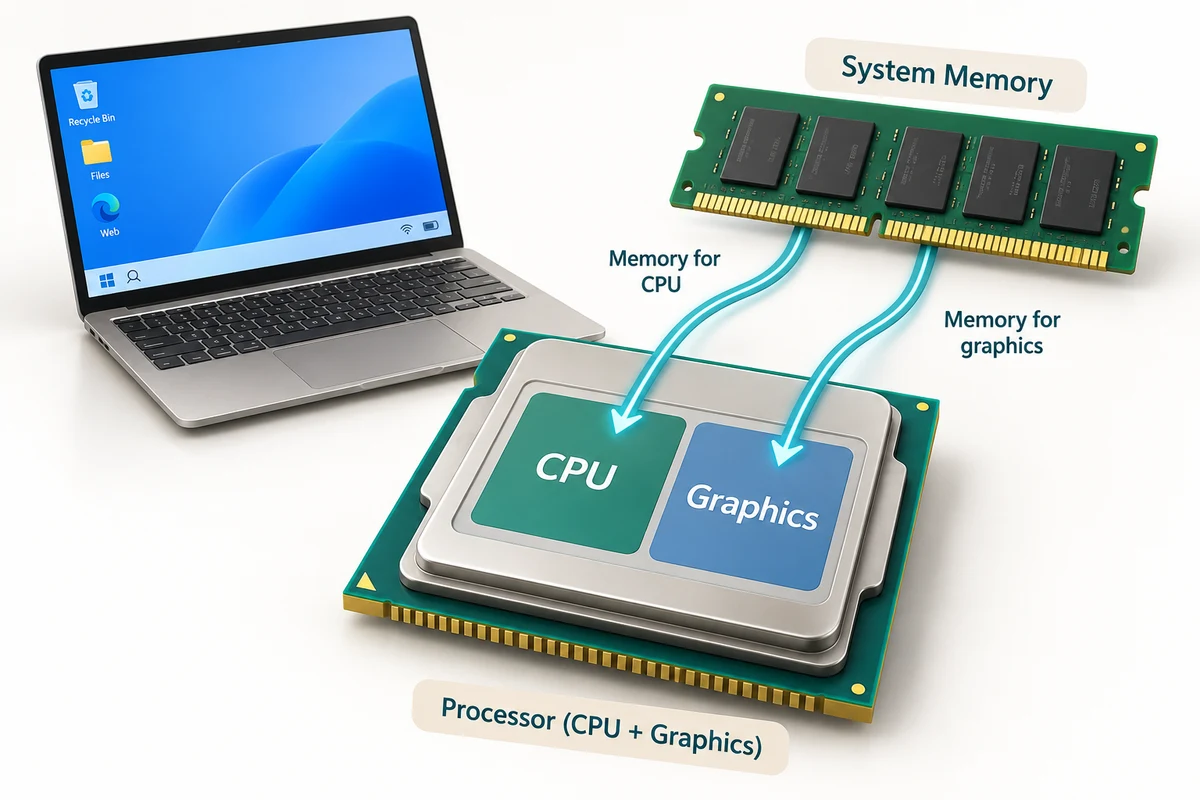
A computer without a large graphics card can still show a desktop, play videos and handle many other tasks using integrated graphics. Its abilities depend on the particular model. Not every CPU includes integrated graphics, so a specification sheet is more useful than an assumption.
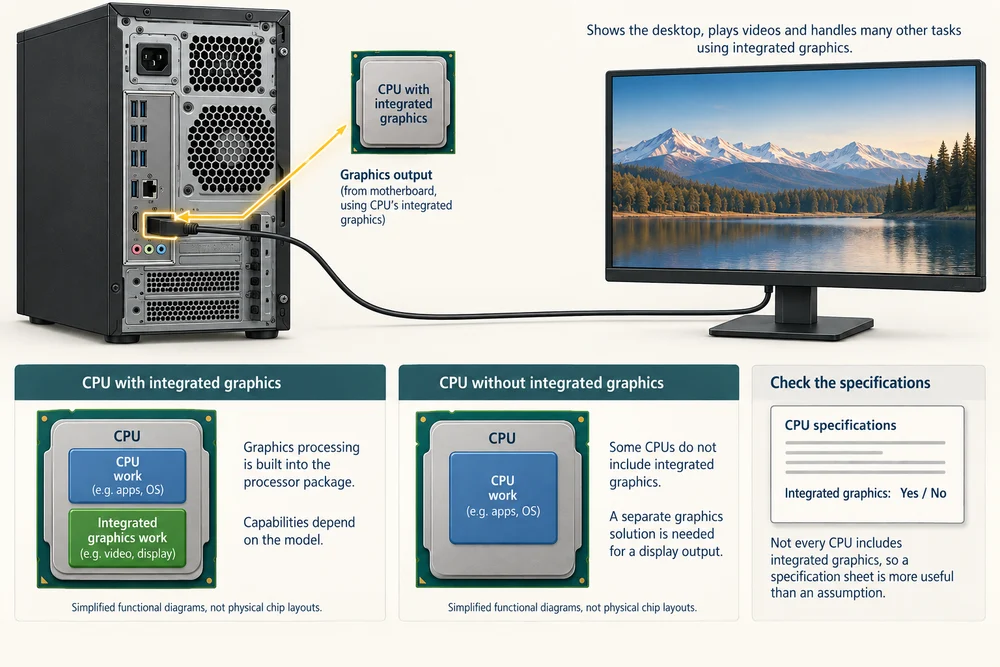
Integrated graphics are real electronic hardware, even though you cannot point to a separate card. Sharing RAM means graphics and other running programs draw on the same system-memory resource, rather than each having a completely separate supply.
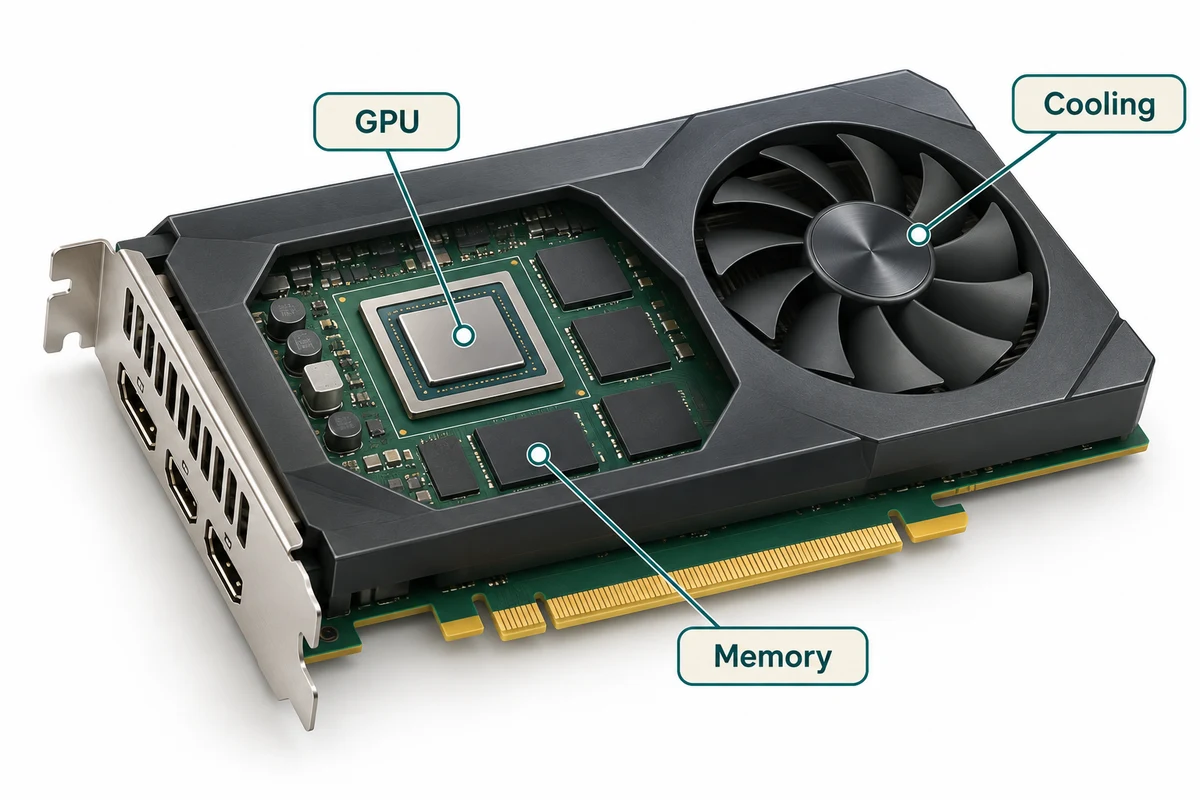
A separate graphics card
A desktop graphics card usually contains a GPU, its own graphics memory, cooling and sockets for displays. The fans in the picture are cooling parts; they are not the graphics processor itself, which sits beneath its cooler.
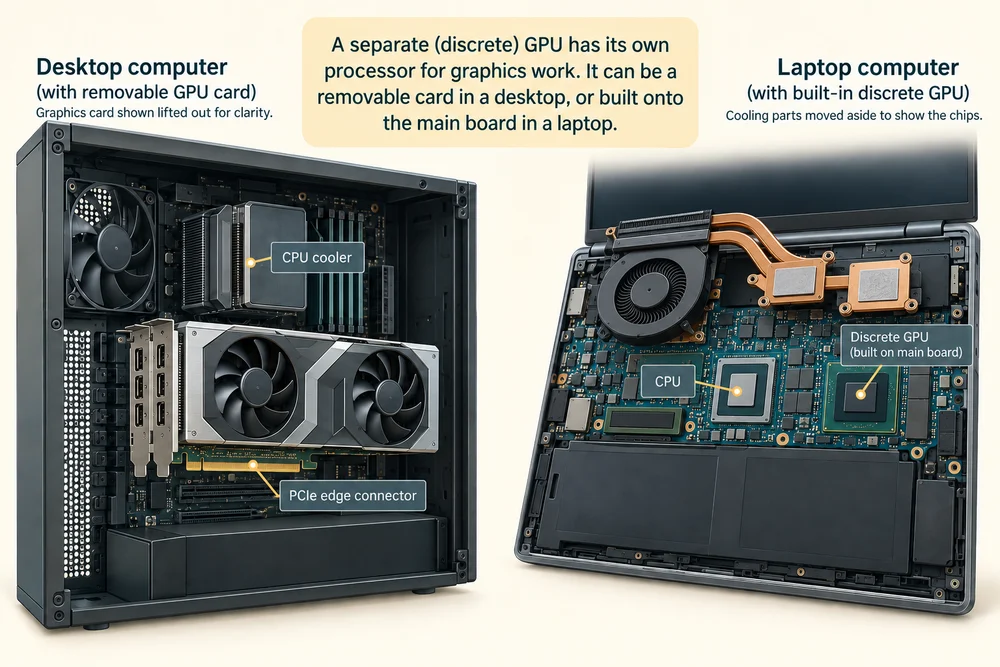
A separate or discrete GPU can suit demanding graphics work. In a laptop it may be built onto the main board rather than look like this removable desktop card. The term separate describes its processing role, not a promise that you can remove it.
The card’s circuit board connects its processor, memory and other electronics. Its edge connector links the card to the computer, while the display sockets connect towards a screen. The whole board and cooler together are the graphics card; the GPU is one part.
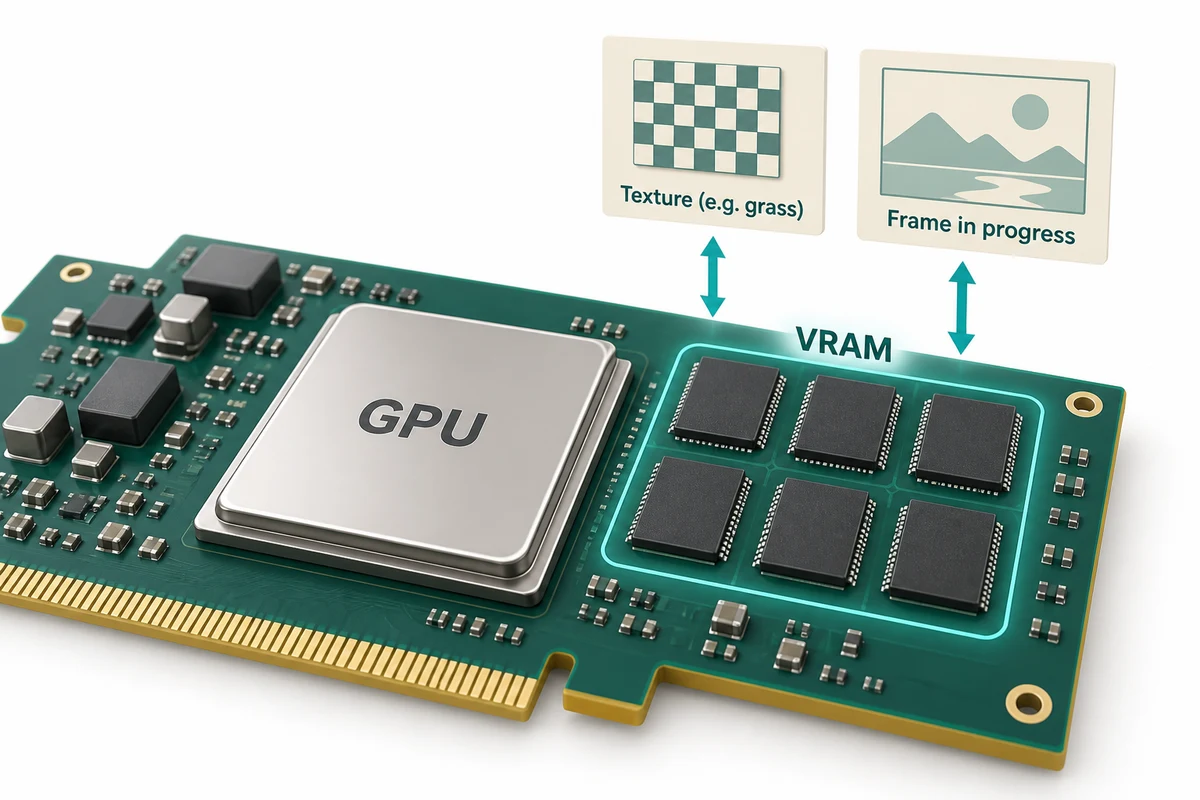
What graphics memory holds
Graphics memory holds information needed for graphics work, such as images used to cover objects in a game and pictures being prepared for display. Dedicated graphics memory is often called VRAM. It is different from the storage where your saved photos live.
Integrated graphics commonly share system RAM, while a discrete GPU usually has its own graphics memory. A larger memory figure alone does not prove that one GPU is faster: the processor design, memory performance and task also matter.
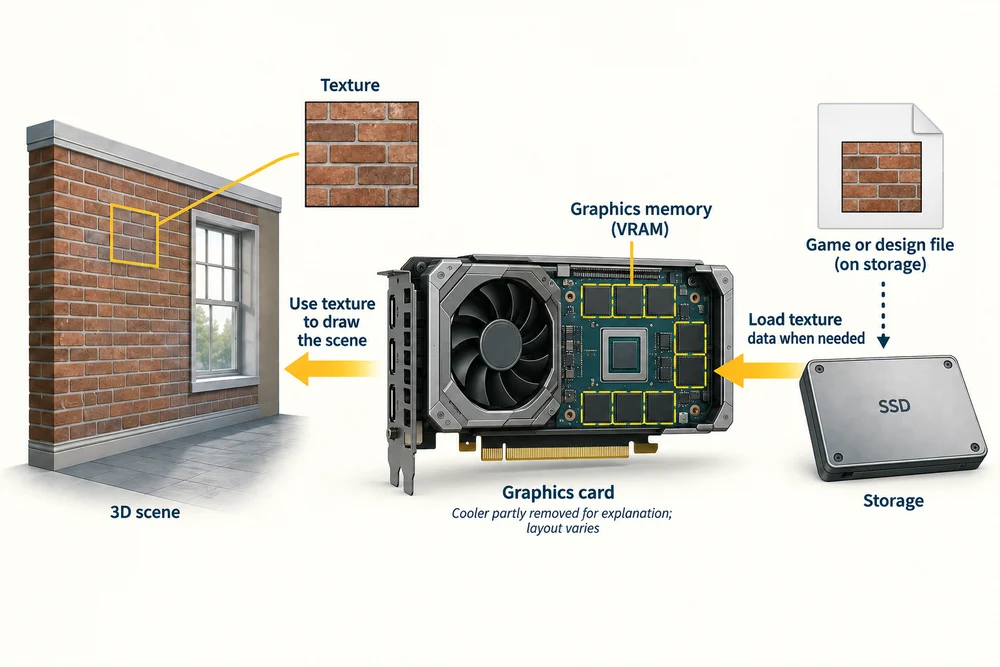
A texture is an image used on a surface in a three-dimensional scene, such as the brick pattern on a wall. Graphics memory can hold that texture while it is needed. The saved game or design files remain on storage.
Different tasks need different graphics
Writing a letter and running a detailed three-dimensional game place different demands on graphics processing. Video editing and some design or calculation programs can also use the GPU when the software supports it.
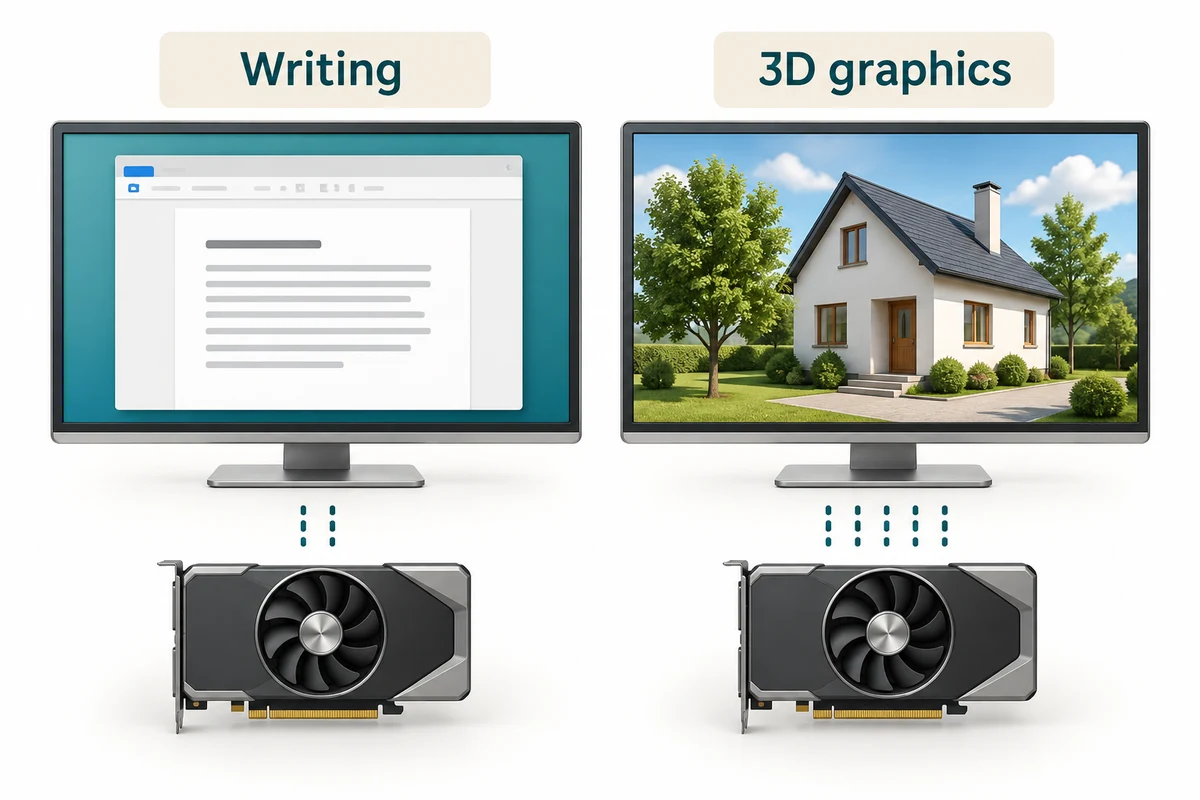
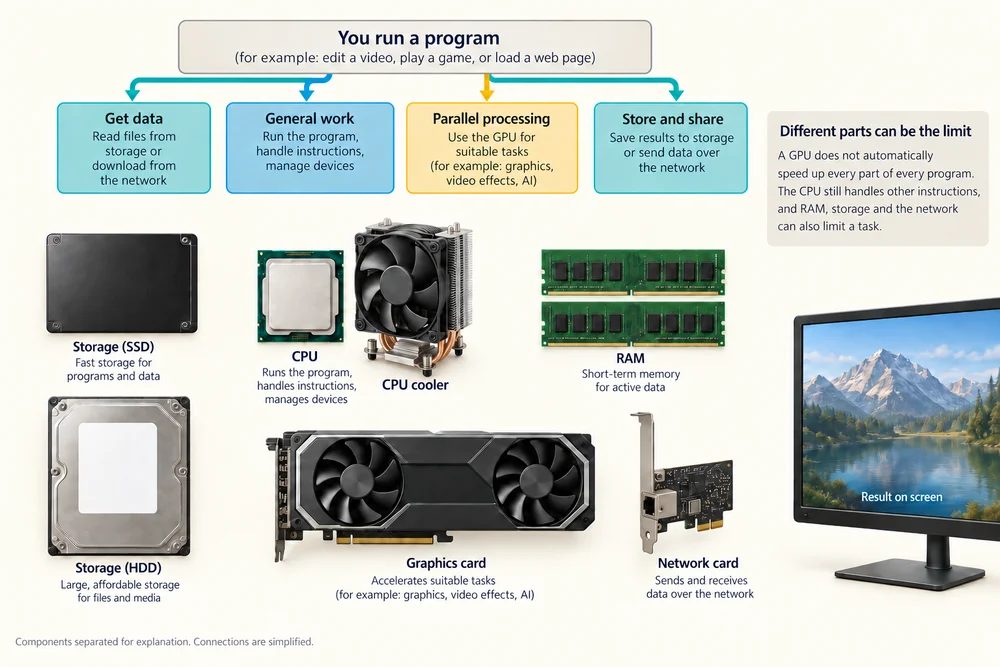
A GPU does not automatically speed up every part of every program. The CPU still handles other instructions, and RAM, storage and the network can limit a task too. Match the explanation to what the computer is being asked to do.
A detailed scene can involve many objects, shadows and changing views. Preparing each new picture means calculating those details again. This explains why a visually complex moving scene can demand more graphics work than a mostly unchanged page of text.
From the computer to the screen
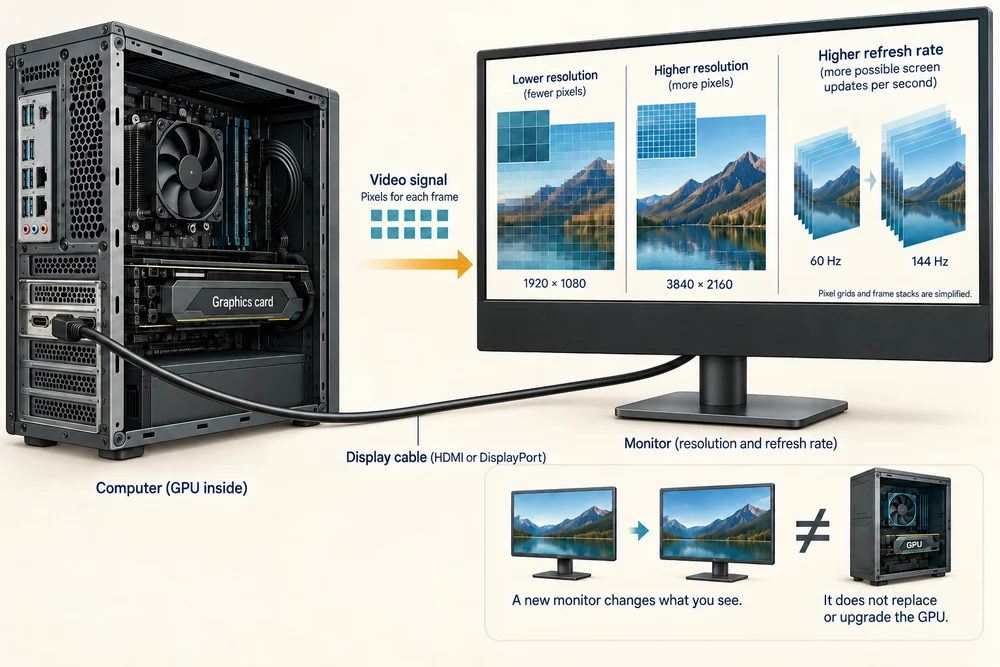
The completed display signal reaches a monitor through a supported connection, such as HDMI or DisplayPort. Some desktop display sockets belong to a separate graphics card; others are on the main board. Which sockets work depends on the computer’s configuration.
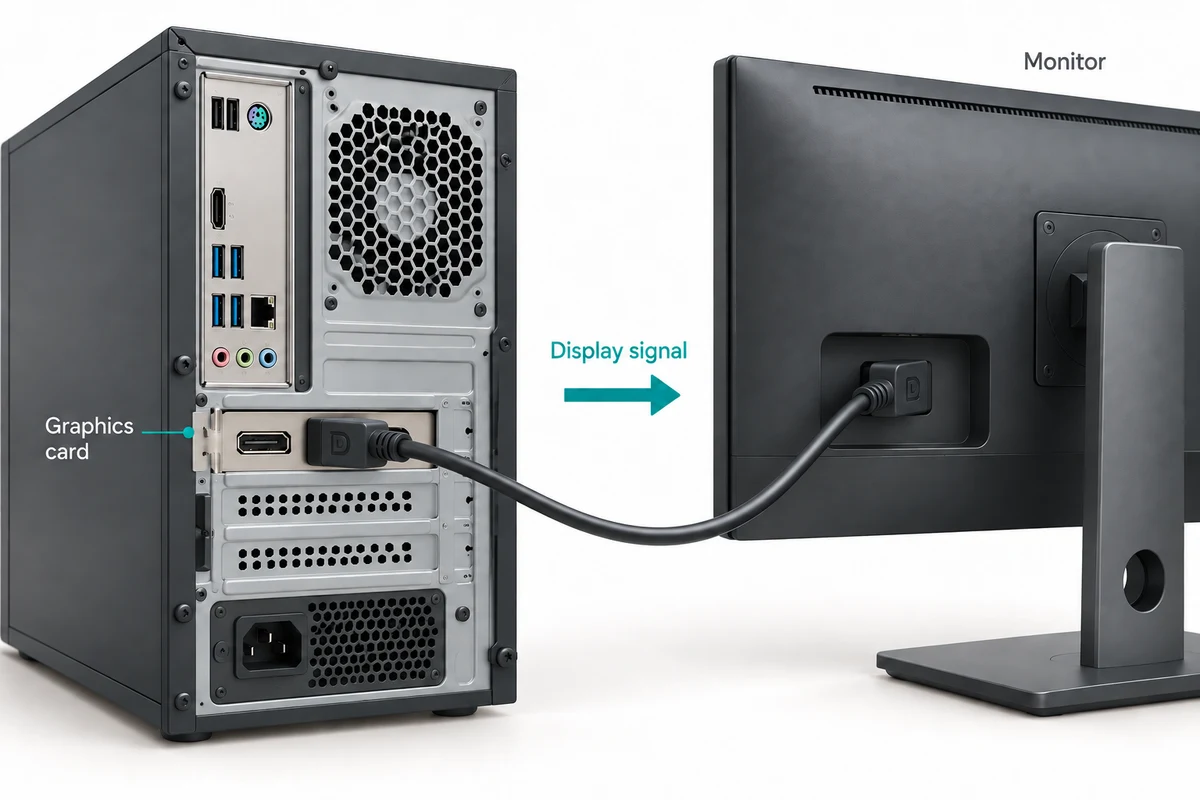
The monitor’s resolution and refresh rate also affect what you see. More pixels can mean more graphics work. A new screen does not itself replace or upgrade the GPU inside the computer. Use the model’s instructions when identifying connections.
Resolution describes the number of picture pixels, often as width by height. Refresh rate describes how often the screen can update, usually in hertz, written Hz. These are different from the size of the screen measured across it.
Check your understanding
Click Start 3 questions to begin a selection from this lesson’s ten questions. Read the guidance beside each question. After the first two correct answers, click Next question. When all three are correct, click Continue below. With a keyboard, press Tab to reach a button and Enter to activate it.
In guided learning, click Start 3 questions to receive a selection from this lesson. Click the circle beside an answer, then click Check answer. Read the feedback and try again if needed. Click Next question after each correct answer. Answer all 3 correctly to continue.
Returning to guided learning keeps the questions and answers in your current attempt.
Read all 10 questions and explanations
Why is a GPU useful when preparing a detailed screen image?
Answer: It can perform many similar calculations at the same time.
Yes. The GPU is suited to parallel calculations used in graphics. Storage keeps original files and the screen displays the resulting pixels.
Which description correctly separates graphics processing from the monitor’s job?
Answer: The GPU prepares graphics and the monitor displays the result.
Yes. The GPU prepares graphics. The monitor displays the result, while saved image files remain on storage.
A screen image is described as 1920 pixels wide. What are those pixels?
Answer: The tiny picture elements across the image.
Yes. Pixels are picture elements. A frame is a whole picture, and processing cores are hardware that performs calculations.
Where is the graphics hardware in the integrated arrangement taught here?
Answer: Built into the processor package.
Yes. In this arrangement, integrated graphics are built into the computer’s processor package. A separate card is a different arrangement, and the monitor displays the result.
A computer has no separate graphics card. What would explain its ability to show a desktop?
Answer: Its processor package includes suitable integrated graphics.
Yes. Suitable integrated graphics can prepare the display without a separate card. RAM and the monitor still have different roles.
A graphics card has large visible fans. Which description fits those fans?
Answer: They move air to cool the graphics hardware beneath.
Yes. The fans are cooling parts. The GPU and graphics memory are electronic components on the card.
Where do integrated graphics commonly keep their working information?
Answer: In a shared portion of the computer’s system RAM.
Yes. Integrated graphics commonly share system RAM. A separate graphics card commonly has dedicated graphics memory; saved-file storage has a different role.
A game is using VRAM for textures. What is the VRAM doing?
Answer: Holding information needed for current graphics work.
Yes. Graphics memory holds working information such as textures. The saved game remains on storage, and memory is not additional processing cores.
Which activity usually asks for the most graphics processing?
Answer: Moving through a detailed three-dimensional game.
Yes. A detailed moving 3D scene needs repeated graphics calculations. Reading text or renaming a file usually needs much less graphics work.
A new monitor can display more pixels. What has happened to the computer’s existing GPU?
Answer: It is the same GPU, and the larger image may give it more work.
Yes. Replacing the monitor does not replace the GPU or add its memory. Preparing an image with more pixels can increase graphics work.
Connect the idea to your computer
These optional observations help connect the pictures with your own computer. You can finish the lesson without opening the case, changing a setting or buying a part.
- 1
If you have the computer’s specification sheet, look for Graphics or GPU. Read whether it mentions integrated graphics or a named separate graphics processor.
- 2
If the sheet gives a graphics-memory amount, notice whether it says shared or dedicated. Compare those words with the graphics-memory explanation in Learn.
- 3
From outside a desktop computer, look at its display cable connection without moving the cable. The model’s documentation can identify which socket group it uses. You do not need to change a connection.
If you do not have the specification sheet or cannot identify a part, use the lesson pictures instead. Every computer is different. This activity is about understanding, not fitting or replacing hardware.
Looking to build a computer or find one that suits your needs? Contact Basic Computing for help.
Look inside your computer
Explore hardware in 3D
Choose an internal component below. Click once on Open 3D model to load a model you can turn and inspect.
Meet the component
Graphics card
A graphics card processes images. It combines a graphics processor, its own memory, a circuit board and a cooling system.
Choose a part
Click once on a named part above to learn what it does. When the 3D view is open, a bright yellow glow highlights it on the model.
These are simplified, representative designs. Details and proportions vary between real products. Separated parts are a teaching illustration, not instructions for taking a device apart.