Understand working memory (RAM)
Understand working memory (RAM)

You are going to identify parts in the numbered pictures, explore six illustrated topics, then answer three short questions about what you have learned.
You will understand what RAM does for current work and read basic memory descriptions with more confidence.
RAM means random access memory. It is fast working memory that holds information and instructions the computer is using now. An open document, a running program and a busy browser can all need some of it.
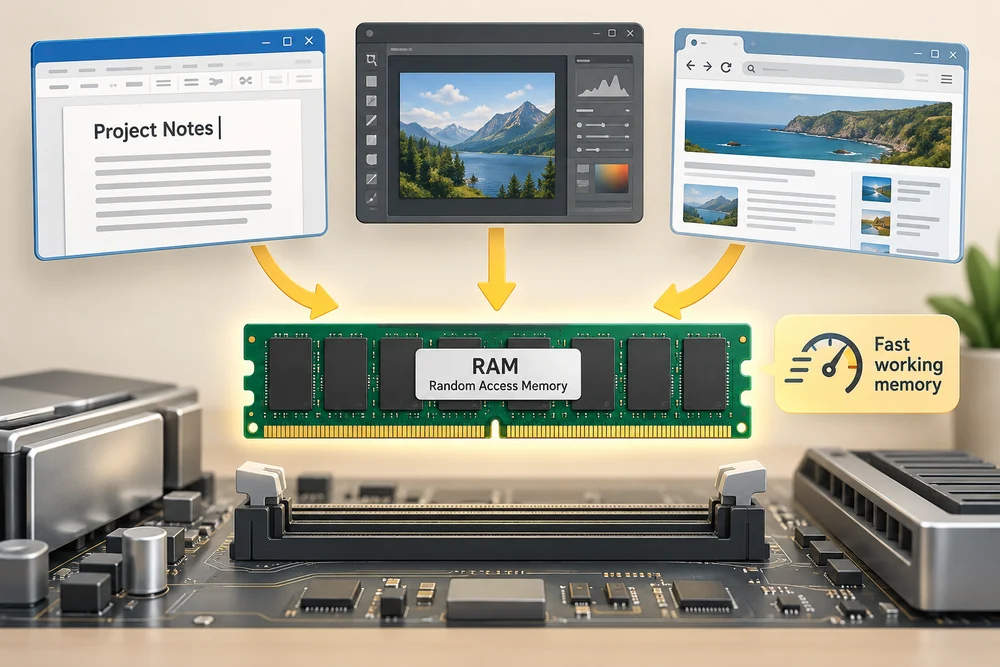
Think of RAM as space on a worktable, with storage as the place where work is kept between sessions. A bigger table can hold more current work, but it does not automatically make the person doing that work faster. This is a comparison of their roles, not how electronics physically operate.

RAM normally needs power to retain its contents. Saved files live on storage, such as an SSD or hard drive. That difference matters more to a beginner than memorising memory-chip specifications.

Explore how it works
Explore the numbered parts first. Click or tap a spot, or choose its named button, then click Read explanation to move to its description. The six topic cards further down explain the wider ideas. Click a card once to read more, then Back to the pictures to return. With a keyboard, press Tab to reach a button and Enter to activate it. Explore at your own pace.
Read the parts of a RAM module
This enlarged example is a desktop memory module. Laptop modules can be shorter, and some computers have memory permanently attached to the motherboard.
Memory chips
These chips hold information the computer is using now. Their contents normally need power to remain available. Your saved documents belong on storage, not only in these chips.
Circuit board
The board supports the chips and its fine electrical tracks connect them to the contacts. One module is an assembly containing several parts, not one large memory chip.
Gold contacts
These contacts make an electrical connection inside a compatible memory slot. They carry information and power. The illustrated colour helps identify the connection edge.
Key notch
The gap in the contact edge helps match the module to the correct slot and orientation. A similar appearance does not prove compatibility; the computer must support the exact memory type.
A place for current work
Programs use RAM to keep current instructions and information close to the processor. This is quicker than repeatedly fetching all of that information from a storage drive. The operating system manages how memory is shared between tasks.
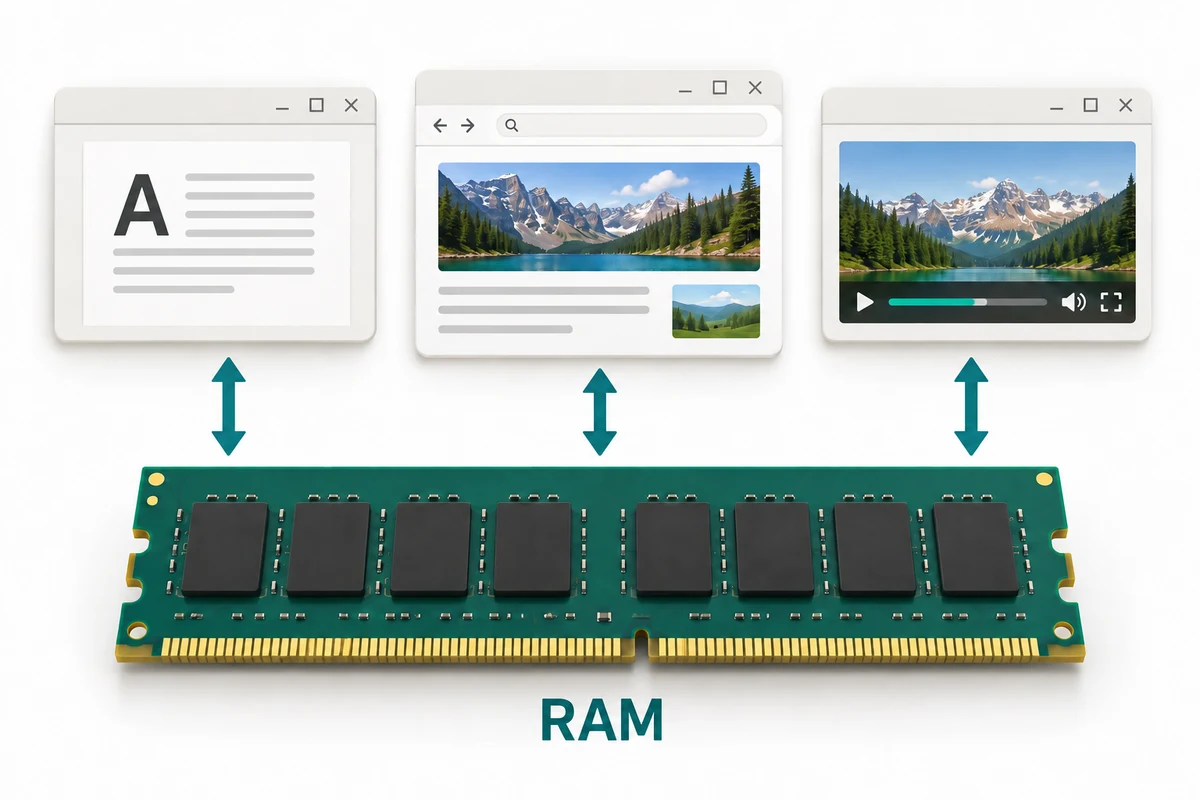
When you have several programs and browser pages open, they can all use memory. An open page does not use one fixed amount: a simple page and a busy video page can have very different needs. The amount in use changes as you work.

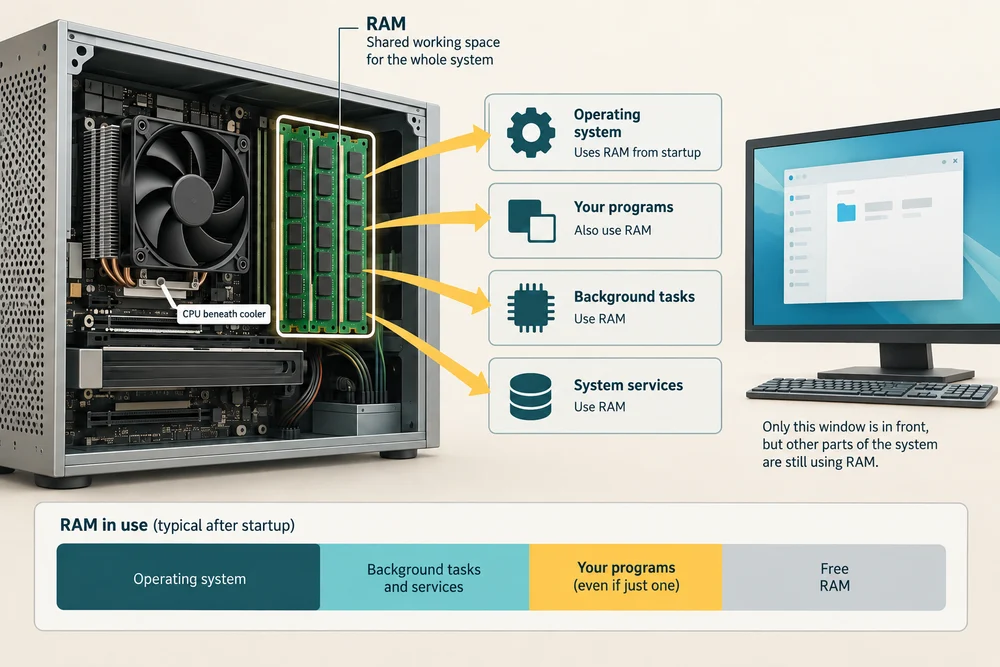
The operating system needs RAM too, even before you open your own programs. Seeing some memory already in use is therefore expected. RAM is shared working space for the whole running system, not just the window currently in front of you.
Working memory is not saving
Ordinary system RAM is temporary: it normally loses its contents when power is removed. Storage keeps saved information between sessions. Clicking a program’s Save control, or a supported automatic-save feature, writes the current changes to storage.

Some systems can restore an earlier session because they saved information to storage first. That does not mean RAM keeps everything without power. Keep the ideas separate: working on a letter and saving the letter are different actions.
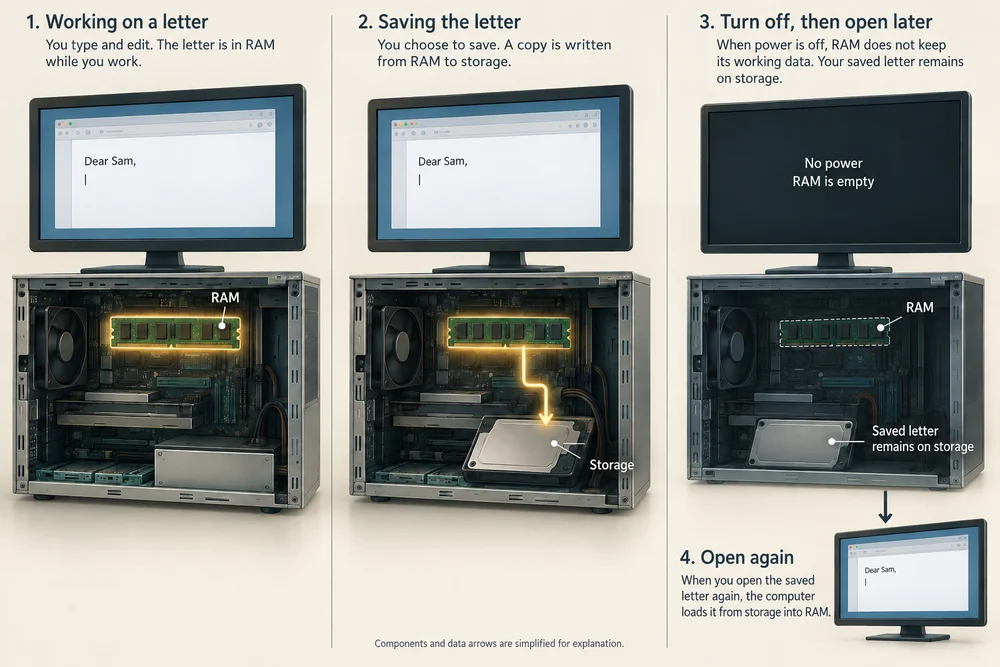
If you saved a letter yesterday and change it today, the saved version and the current unfinished version can differ. Losing the unfinished work does not necessarily remove yesterday’s saved copy, but the latest changes may be missing from it.

What a GB figure means
RAM capacity is commonly shown in gigabytes, written GB. For example, 16 GB is more working-memory capacity than 8 GB. It says how much information can be held, not that every task will run twice as fast.

Storage also uses GB and larger units such as TB, but it is a separate amount. A computer described as 16 GB RAM and 512 GB SSD has two different resources. The 512 GB is saved-storage capacity, not an extra 512 GB of RAM.
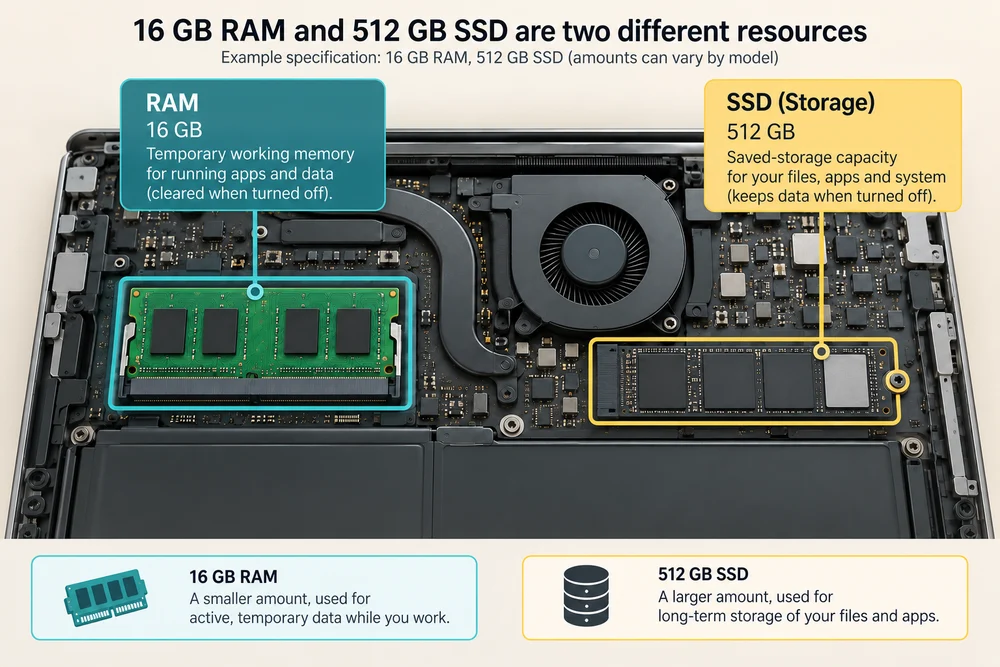
There is no fixed number of open programs that fits in a given amount of RAM. Different programs and documents need different amounts. Capacity describes the available space; what you are doing determines how much of it is needed.
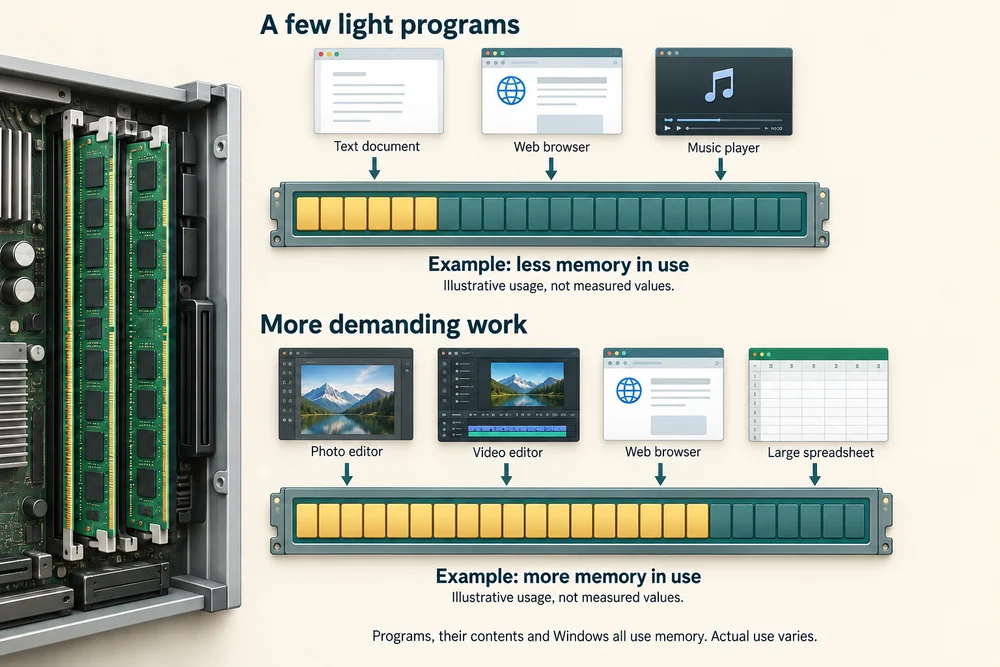
When current work needs more space
When RAM is under pressure, the system may move some information to storage and bring it back when needed. This can make switching between busy tasks slower because storage is slower to access than RAM.

Having enough RAM can help with a crowded workload. Once there is enough for the task, adding more may bring little benefit. A slow program can also be limited by the processor, drive or network, so slowness alone does not tell you to buy more memory.

Closing an unneeded program can release memory it was using for other work. That does not increase the amount of RAM physically fitted. It changes how the existing working space is shared, and it does not delete that program’s saved files.

Desktop and laptop examples
Desktop computers often use long memory modules called DIMMs. Many laptops use shorter modules called SODIMMs, while others have memory permanently attached to the main board. The shorter module in this picture is a common laptop example.
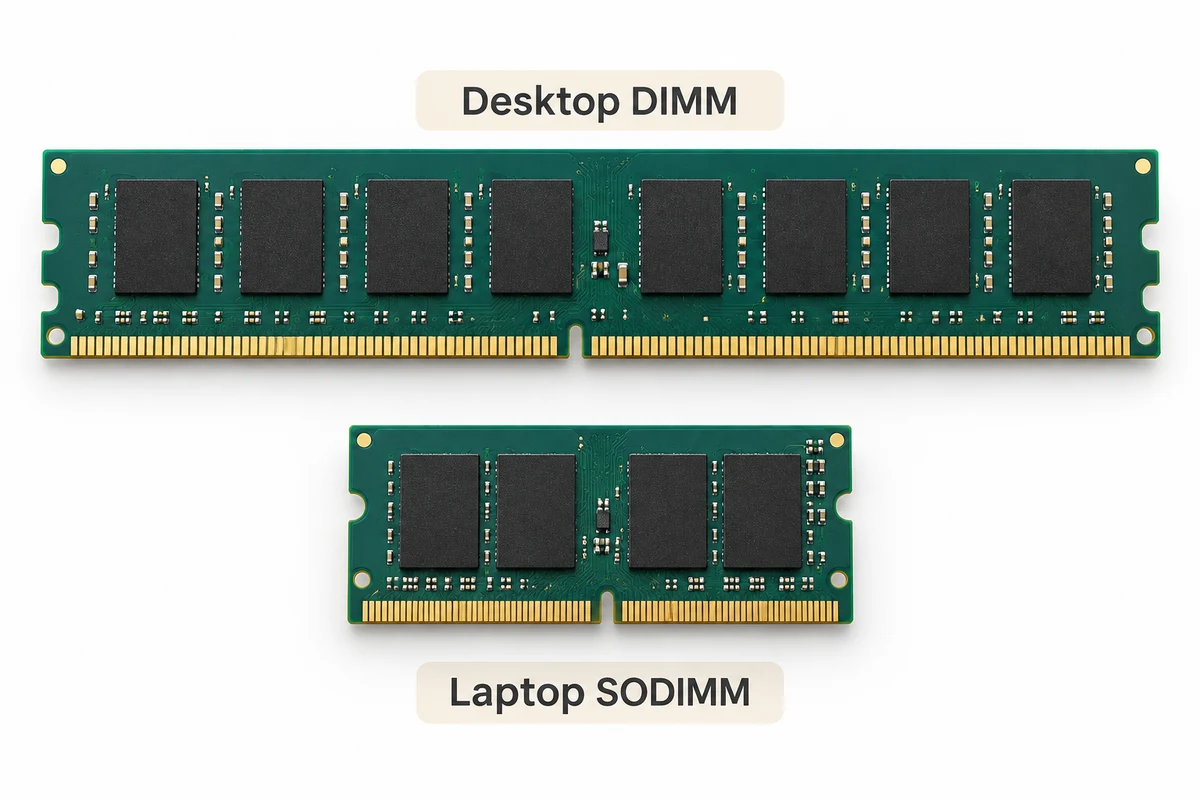
A module’s gold contact edge connects it to a matching memory slot. The notch and supported type matter. Two pieces that look rather alike are not automatically interchangeable, and not every laptop has replaceable memory.

The dark rectangular chips on a typical module hold the working information. The circuit board supports and connects them. The gold contacts carry electrical connections into the slot, while the cut-out notch helps distinguish a matching connection. The notch does not store anything.

The right type for the computer
Names such as DDR4 and DDR5 describe different generations of memory technology. They are not simply settings you can switch between. The computer’s processor and main board must support the memory type and capacity it uses.
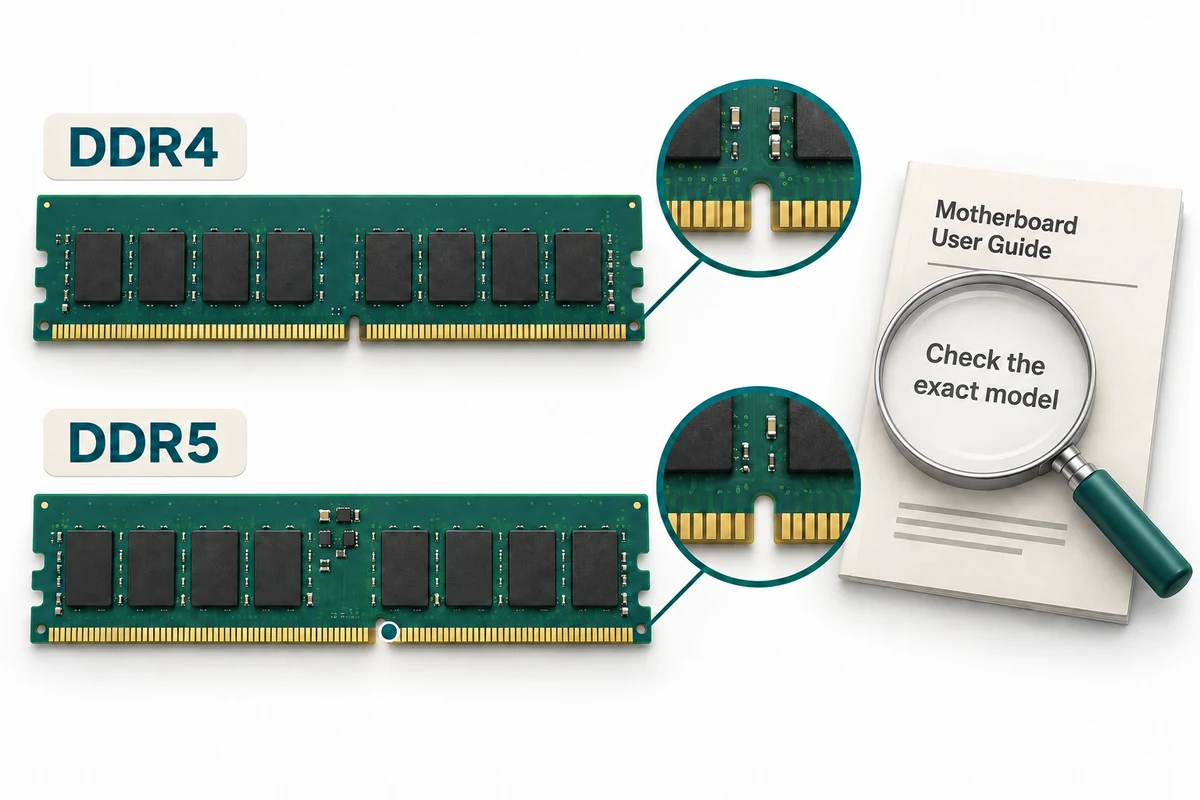
A memory speed figure is also different from its GB capacity. For understanding your own computer, read the specification’s RAM amount and type. Checking a model’s supported memory matters more than choosing a module just because its number is larger.

A module can have the right general shape but the wrong supported technology. Its notch is a useful physical clue, not a complete compatibility check. The exact computer model’s specification brings together the amount, generation and other requirements.

Check your understanding
Click Start 3 questions to begin a selection from this lesson’s ten questions. Read the guidance beside each question. After the first two correct answers, click Next question. When all three are correct, click Continue below. With a keyboard, press Tab to reach a button and Enter to activate it.
In guided learning, click Start 3 questions to receive a selection from this lesson. Click the circle beside an answer, then click Check answer. Read the feedback and try again if needed. Click Next question after each correct answer. Answer all 3 correctly to continue.
Returning to guided learning keeps the questions and answers in your current attempt.
Read all 10 questions and explanations
Several programs are open. What does RAM provide for them?
Answer: Space for the information and instructions currently in use.
Yes. RAM is working memory. Storage keeps saved files, while processing units carry out instructions.
Power is removed before current work has been saved elsewhere. What happens to ordinary RAM contents?
Answer: They are lost when RAM no longer has power.
Yes. Ordinary RAM needs power. Preserving current work elsewhere requires a separate saving process.
A letter is open with changes. What does saving those changes do?
Answer: Write them to storage for use between sessions.
Yes. Saving writes the changed information to storage. It does not make ordinary RAM retain information without power.
A specification lists 16 GB of RAM. What does that amount describe?
Answer: How much working information the memory can hold.
Yes. RAM’s GB figure describes working-memory capacity. Processing speed and saved-file space are separate measurements.
A computer lists 16 GB RAM and a 512 GB SSD. How should you read the 512 GB amount?
Answer: It is the saved-storage capacity, separate from RAM.
Yes. The SSD figure is its storage capacity. It is neither extra RAM nor a promise about how much space is currently free.
What can happen when current work needs more RAM than is available?
Answer: Some working information may move to slower storage and be fetched back.
Yes. The system may move working information to slower storage. Programs need different amounts, and deleting saved documents does not increase fitted RAM.
A task already has enough RAM. What might happen if the RAM capacity is doubled?
Answer: The task may gain little because another part limits its speed.
Yes. More RAM helps when working space is a limit. It does not automatically double processing or storage speed.
Which removable memory shape is common in laptops with replaceable RAM?
Answer: A shorter SODIMM module.
Yes. Many laptops use shorter SODIMMs. Desktop DIMMs are longer, and an M.2 storage module is not system RAM.
What should you establish before assuming a laptop has replaceable RAM?
Answer: Whether its memory is removable or permanently attached.
Yes. Some laptops have permanently attached memory. Storage space and capacity units do not establish whether RAM is removable.
A computer supports DDR4. Why is a DDR5 module not an automatic upgrade choice?
Answer: The system must support that memory generation and connection.
Yes. Supported technology and physical connection matter. Matching capacity or approximate size does not make DDR4 and DDR5 interchangeable.
Connect the idea to your computer
These optional observations help connect the pictures with your own computer. You can finish the lesson without opening the case, changing a setting or buying a part.
- 1
On a specification sheet you already have, look for Memory or RAM and read its GB amount. Use printed details if you prefer.
- 2
Look separately for Storage, SSD or HDD. Notice that its capacity belongs to a different part, even if it also uses GB.
- 3
If the specification lists a memory type such as DDR4, DDR5 or SODIMM, compare the name with the Learn explanations. Missing details are fine; you do not need to open the computer to find them.
If you do not have the specification sheet or cannot identify a part, use the lesson pictures instead. Every computer is different. This activity is about understanding, not fitting or replacing hardware.
Looking to build a computer or find one that suits your needs? Contact Basic Computing for help.
Look inside your computer
Explore hardware in 3D
Choose an internal component below. Click once on Open 3D model to load a model you can turn and inspect.
Meet the component
Memory (RAM)
RAM temporarily holds information the computer is using. Memory chips sit on a narrow board with contacts that fit a motherboard memory slot.
Choose a part
Click once on a named part above to learn what it does. When the 3D view is open, a bright yellow glow highlights it on the model.
These are simplified, representative designs. Details and proportions vary between real products. Separated parts are a teaching illustration, not instructions for taking a device apart.