Understand drivers and device status
Understand drivers and device status
Compare a device-status message with its next safe support step.
You can explain a driver’s role without treating a warning as a full diagnosis.
A driver is software that helps Windows communicate with hardware. Device Manager lists detected devices and reports status. A warning gives you details to investigate; it does not mean that deleting the device or installing the first download will fix it.

Work through the useful checks
How this works

Press Windows, type Device Manager and click the matching Windows result. On an organisation-managed computer, follow its support process rather than bypassing restrictions.

Click the arrow beside a relevant category to expand it. Double-click a named device (two quick left clicks) to open properties. Under General, read Device status and record its message or code. Close properties with Cancel or its top-right X.

A listed device is detected, but its presence does not prove that every cable or feature works. A missing device needs context too: it could be disconnected or listed under another category.
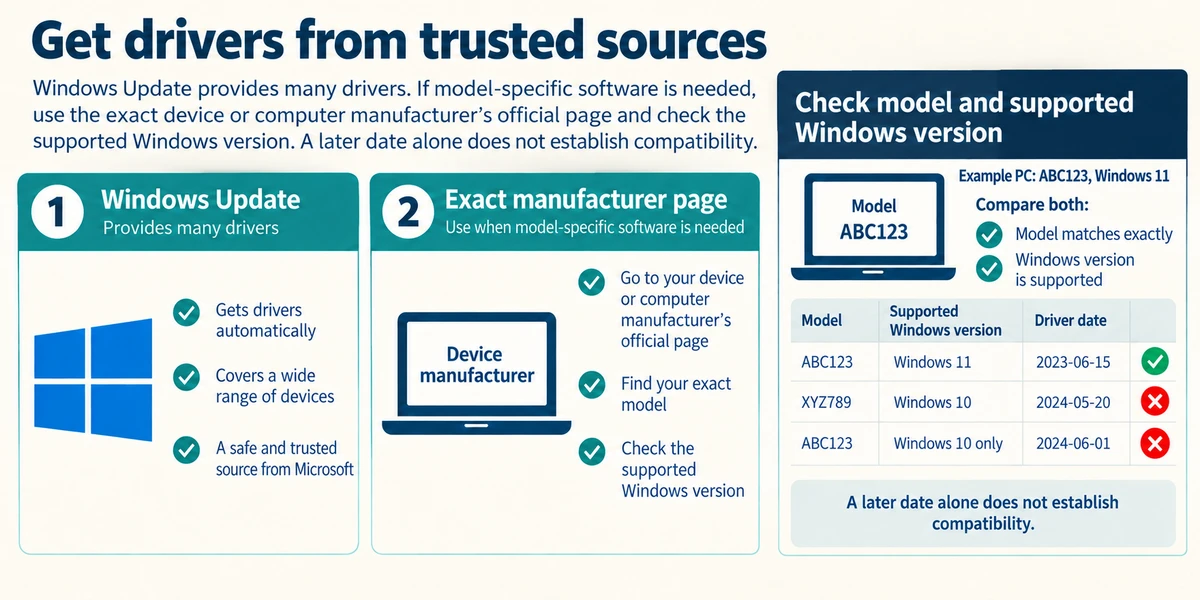
Windows Update provides many drivers. If model-specific software is needed, use the exact device or computer manufacturer’s official page and check the supported Windows version. A later date alone does not establish compatibility.

Disable device, Uninstall device and driver rollback change the system. They are not reading controls. Use them only under trusted guidance for the identified problem, with a recovery plan. Avoid generic driver-updater advertisements.
A warning appears beside your camera. What is useful before changing it?
The exact device name and status message or code.
Check what you understand
In guided learning, click Start 3 questions to receive a selection from this lesson. Click the circle beside an answer, then click Check answer. Read the feedback and try again if needed. Click Next question after each correct answer. Answer all 3 correctly to continue.
Returning to guided learning keeps the questions and answers in your current attempt.
Read all 3 questions and explanations
A newer driver download names another model. What should you do?
Answer: Check your exact model’s official support guidance.
Compatibility depends on the exact hardware model and supported Windows version. A newer date or similar device category does not establish a match.
You are collecting information only. Which action fits?
Answer: Read General and Device status, then close properties.
Reading status is observational. Uninstalling and disabling change how the computer works.
A printer is listed but produces no paper. What does its presence prove?
Answer: Windows has an entry; the remaining print route still needs checking.
A device entry is one clue. It does not confirm the whole physical and software route.
Take this to your computer
- 1
Open Start, type Device Manager and click its Windows result. Expand a familiar category using its small arrow.
- 2
Double-click a device (two quick left clicks), read General and Device status, then close properties. Do not disable, uninstall or update anything for this observation.
The lesson uses fictional examples. Optional checks on your computer can be observational. Settings and available features vary by model and Windows version.
Prefer a more personal, one-to-one lesson? Basic Computing can help. Explore our services.