Understand CPU cooling
Understand CPU cooling

You are going to identify parts in the numbered pictures, explore six illustrated topics, then answer three short questions about what you have learned.
You will recognise common CPU coolers and understand why heat needs a route out of the computer.
When a processor works, it uses electricity and produces heat. A CPU cooler moves that heat away from the processor so it can continue working within its temperature limits.
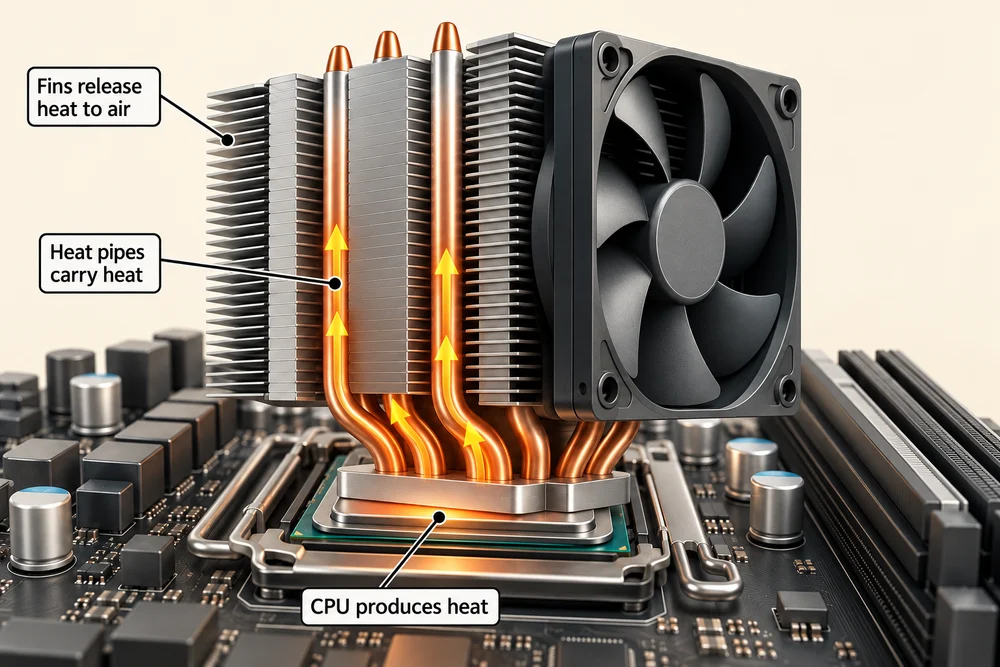
Cooling does not make heat disappear. It transfers heat into the surrounding air, which is why a computer may send out warm air while working normally. The fan you hear is only one part of that process.

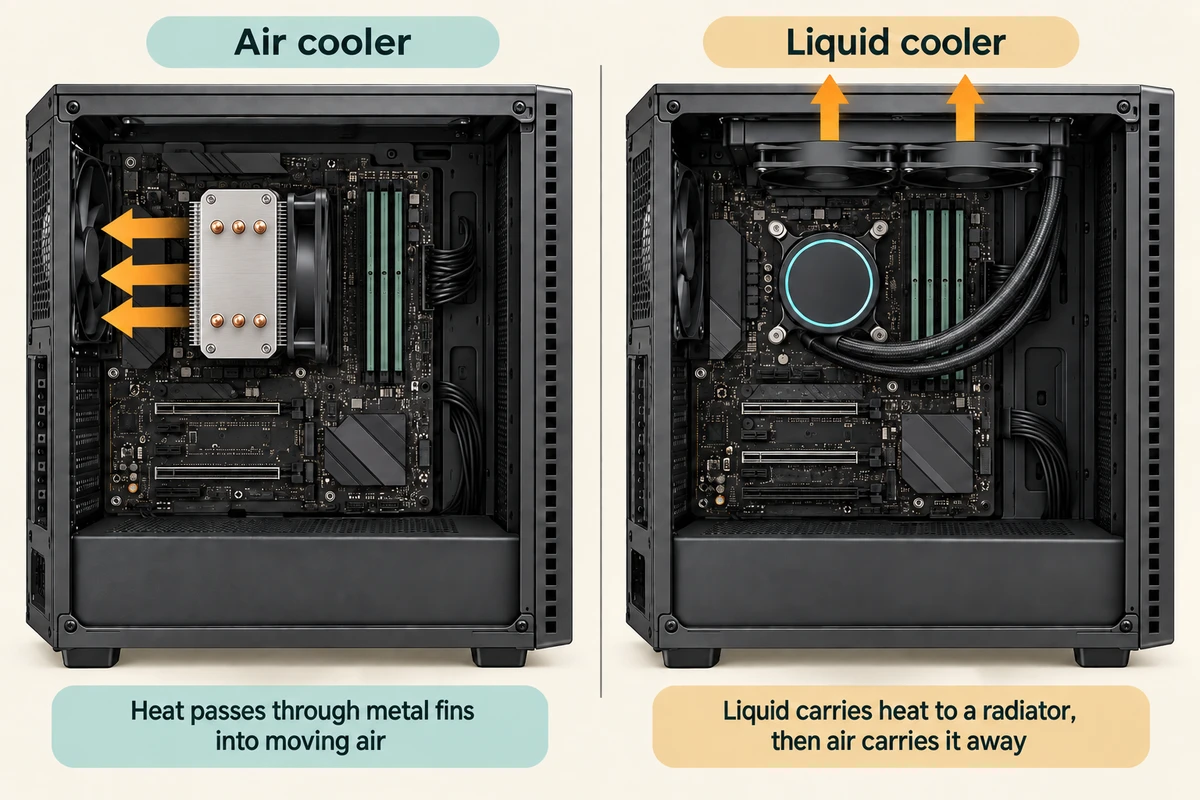
You will compare common air and liquid coolers using pictures. This is an explanation of their jobs, with optional observation from outside your computer. There are no parts to remove or fit.
Explore how it works
Explore the numbered parts first. Click or tap a spot, or choose its named button, then click Read explanation to move to its description. The six topic cards further down explain the wider ideas. Click a card once to read more, then Back to the pictures to return. With a keyboard, press Tab to reach a button and Enter to activate it. Explore at your own pace.
Follow the heat through an air cooler
The fan and fin stack are separated to reveal the heat pipes and contact base. In use the pipes pass through the fins, making a continuous route for heat.
Fan
The fan moves air through the spaces between the fins. Moving air carries heat away. The fan does not make cold air; it helps replace warmed air with cooler surrounding air.
Metal fins
These thin sheets give heat a large surface from which to pass into the air. The gaps allow air to flow between them. A solid block of the same size would have less exposed surface.
Heat pipes
These sealed pipes transfer heat from the base to the fins. Inside, a small amount of fluid evaporates near the warm base and condenses in the cooler region. They are not wires or external water hoses.
Contact base
The flat base sits against the CPU lid, with a thin thermal compound layer filling tiny gaps. Heat must pass across this contact before the rest of the cooler can carry it away.
Heat needs a route out
The CPU’s heat passes into the cooler through surfaces designed to touch closely. A heat-transfer material between them helps bridge tiny gaps. The cooler then spreads and moves that heat away from the processor.
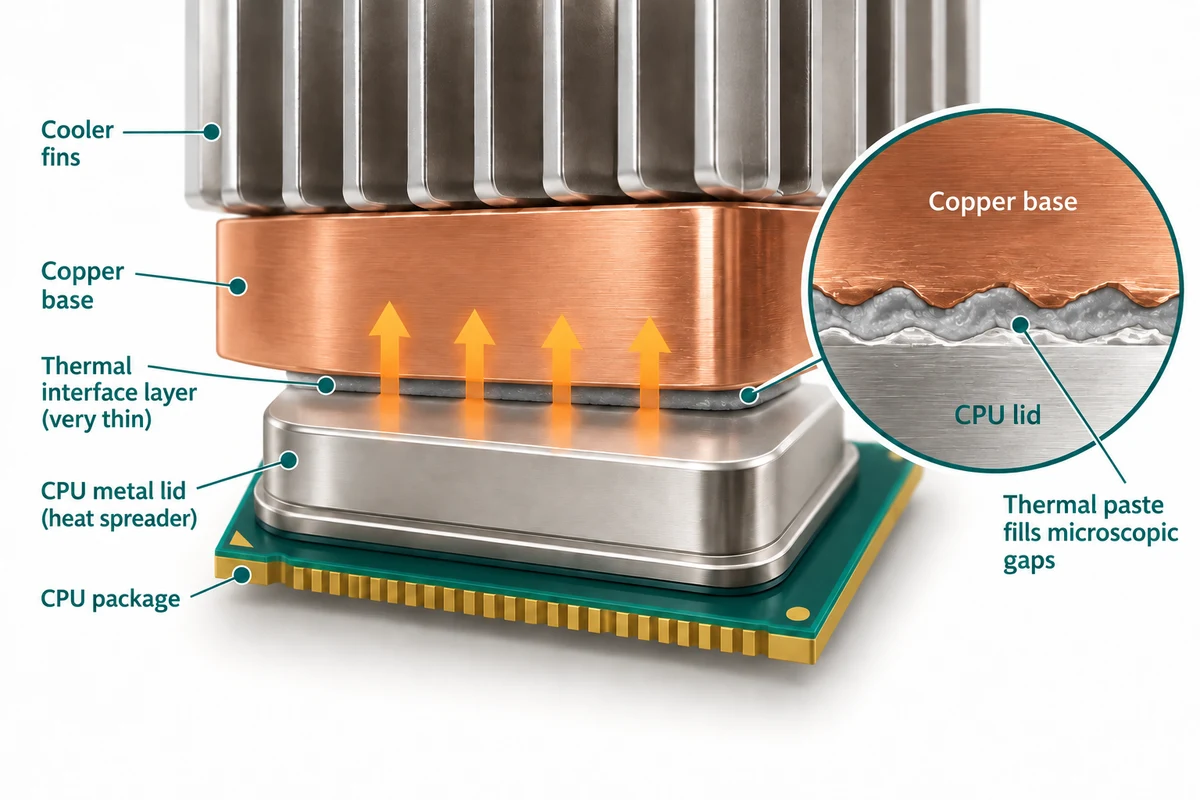
Picture passing a warm object along a chain: heat must have somewhere to go at each stage. A real cooler transfers heat continuously through materials and air. It does not simply lock the heat inside a metal box.

The cooler’s base is the metal contact surface nearest the CPU. It receives the heat before the fins or radiator can release it. The fan does a different job: it moves air, rather than being the surface that touches the processor.

The metal part of an air cooler
An air cooler has a metal heat sink. Its many thin fins provide a larger surface through which heat can pass into the air. Some coolers use heat pipes to carry heat from the base to those fins.
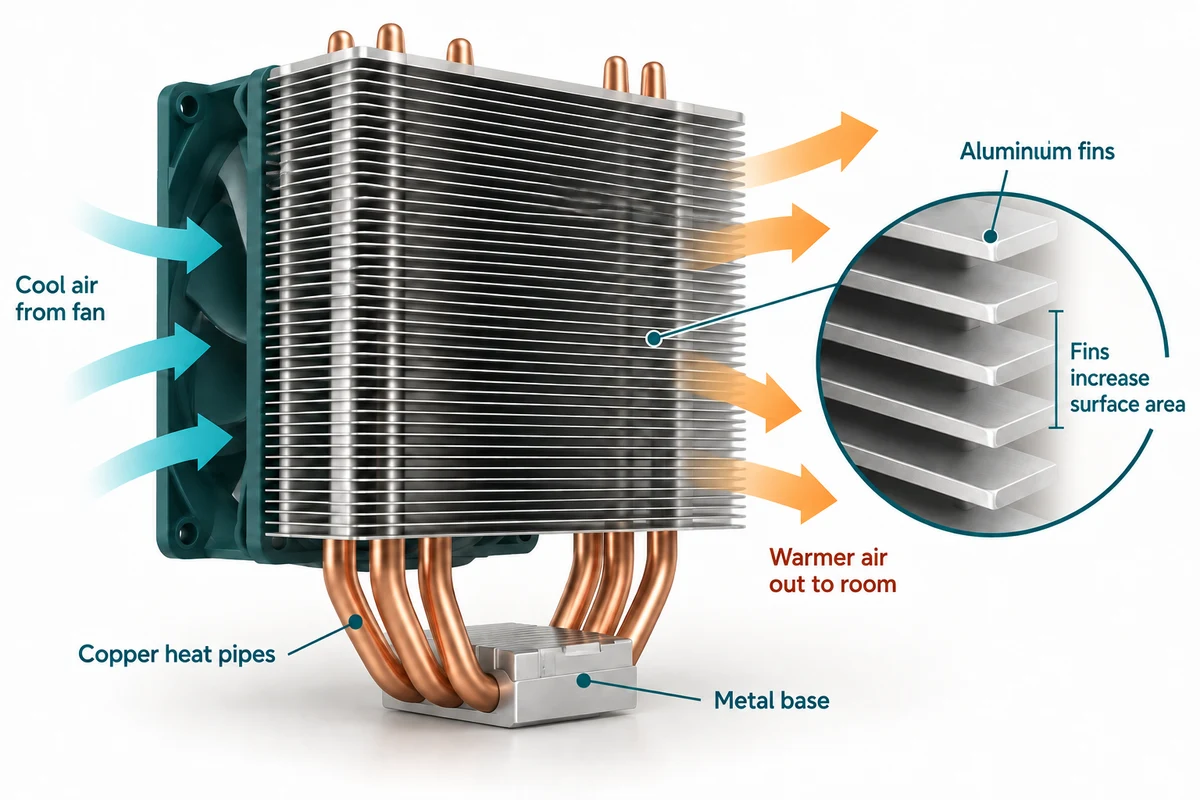
The fins may make it look like a small radiator. Their job is to spread heat over more area, not to store computer files. A desktop tower cooler can be quite large, even though the processor under it is much smaller.

The gaps between the fins matter as well as the metal itself: air needs room to pass through. The curved heat pipes and the flat fins are separate parts with different roles, carrying heat and giving it more surface to leave from.

What the fan contributes
A fan moves air over the cooler’s fins so warmer air is replaced by cooler surrounding air. Case fans help air move through the computer as a whole. They work together with the cooler rather than replacing the metal heat sink.
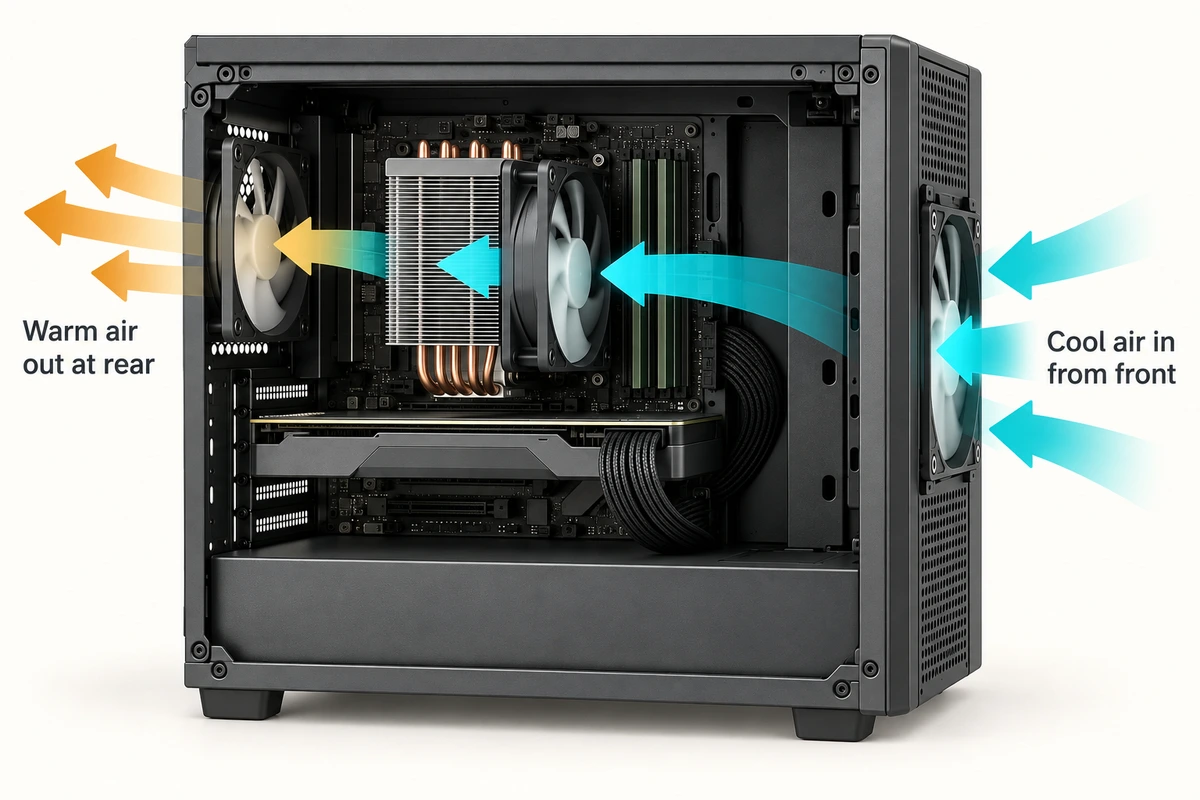
Fan speed often increases when the computer is doing more work. A louder fan during a demanding task does not, by itself, prove there is a fault. Some low-power designs use passive cooling without a fan, so not every computer sounds the same.

A fan has blades arranged around a central motor. The spinning blades move the air. A computer may contain several fans serving different parts, so a visible fan could belong to the processor cooler, a graphics card or the case.

A liquid cooler still uses air
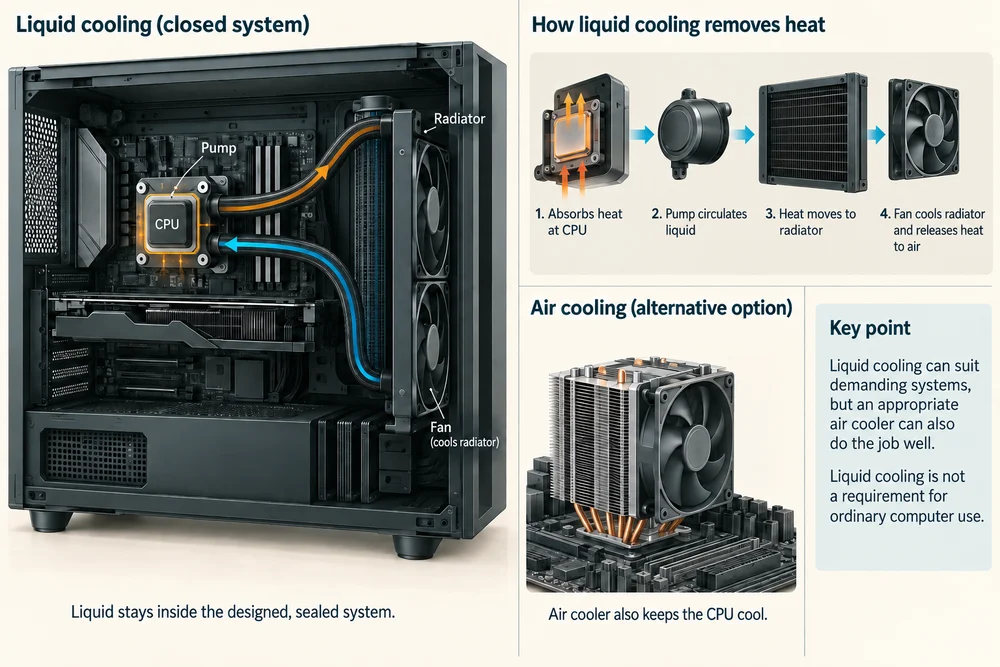
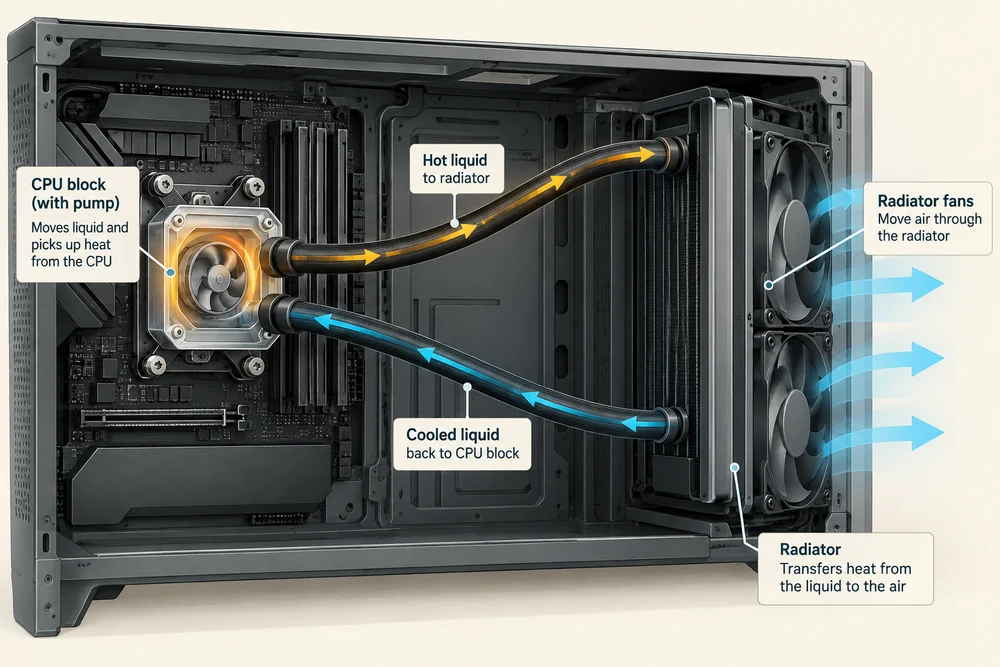
In a common all-in-one liquid cooler, a pump circulates liquid through a block near the CPU and tubes leading to a radiator. Heat moves into the liquid, then from the radiator into surrounding air. Fans usually move air through that radiator.
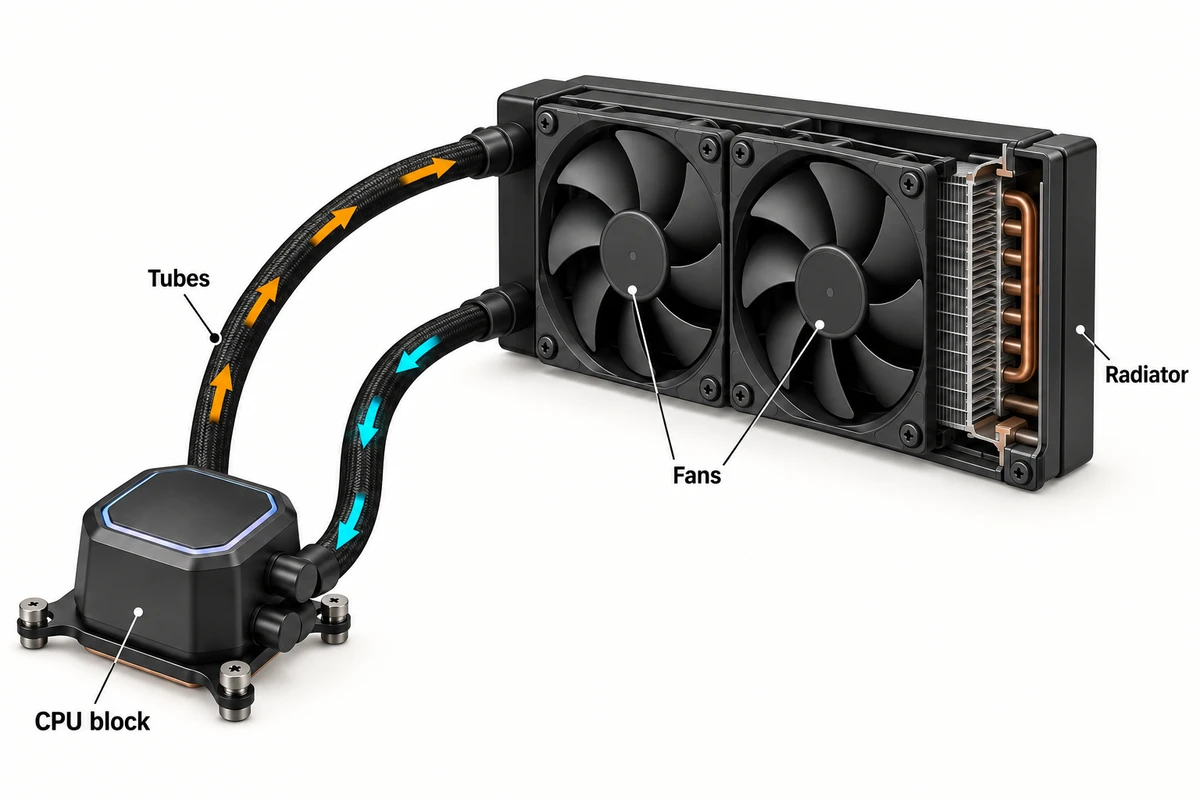
The liquid stays inside its designed system. It is not poured over the computer. A liquid cooler can suit demanding systems, but an appropriate air cooler can also do its job well. Liquid cooling is not a requirement for ordinary computer use.
The two tubes provide a complete return route: liquid travels towards the radiator and back to the CPU block. This lets the radiator sit elsewhere in the case. The pump moves liquid; the radiator fans move air. They are different parts.
Space around the vents matters
A vent is an opening that lets air move into or out of the computer. Covering vents interrupts this route. A laptop on a soft blanket can have less airflow than one on a suitable hard, flat surface.
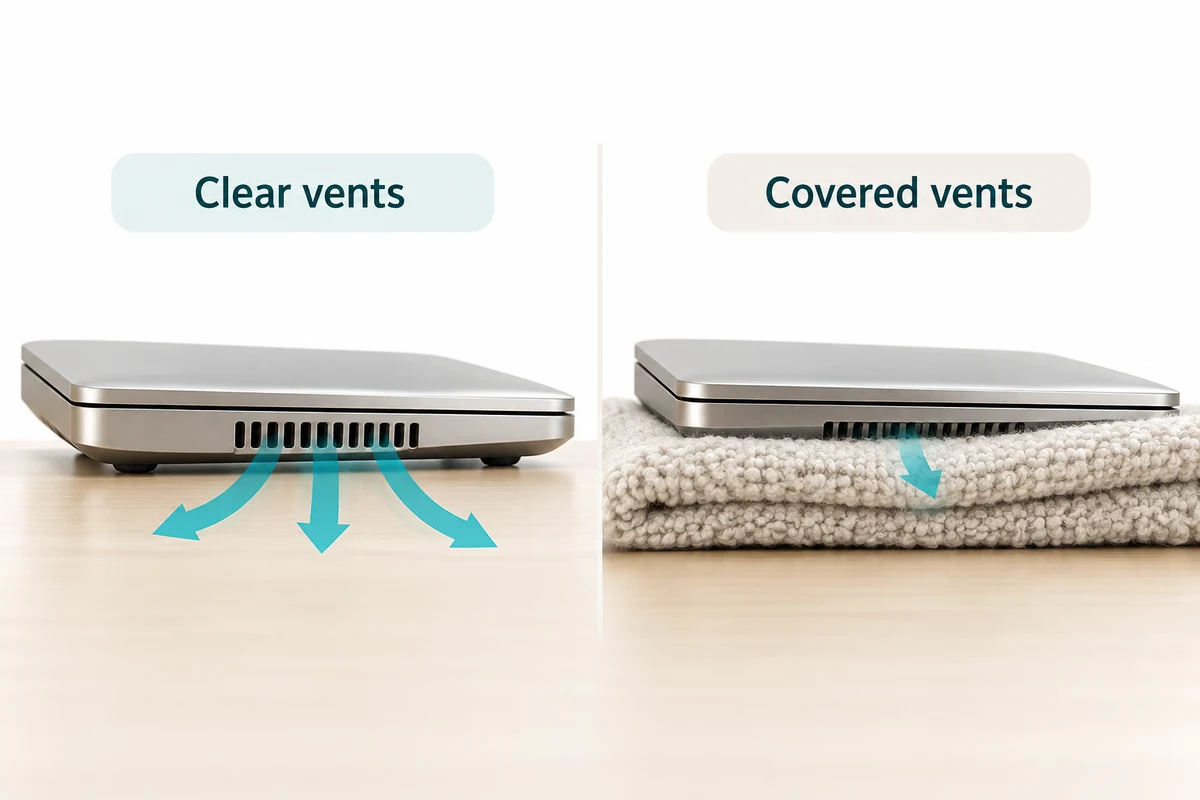
Laptop cooling is usually flatter and more compact than the desktop examples shown here. You can look at outside vents without opening the case. Keeping the manufacturer’s recommended space around them helps the whole cooling system.

Rows of ventilation openings are different from the sockets used for cable plugs. Their purpose is airflow. On some laptops, openings underneath let air in and openings near an edge let warmer air out, but the positions vary by model.

Temperature and performance
Processors have temperature limits. If heat reaches a limit, a processor may reduce its speed to lower heat output. This is often called thermal throttling. Cooling helps a computer sustain its intended work; it does not add extra CPU cores.

Warm air or changing fan speed alone is not enough to diagnose a problem. If a computer repeatedly shuts down or reports overheating, use the manufacturer’s support guidance. There is no single normal temperature or fan noise that applies to every model.
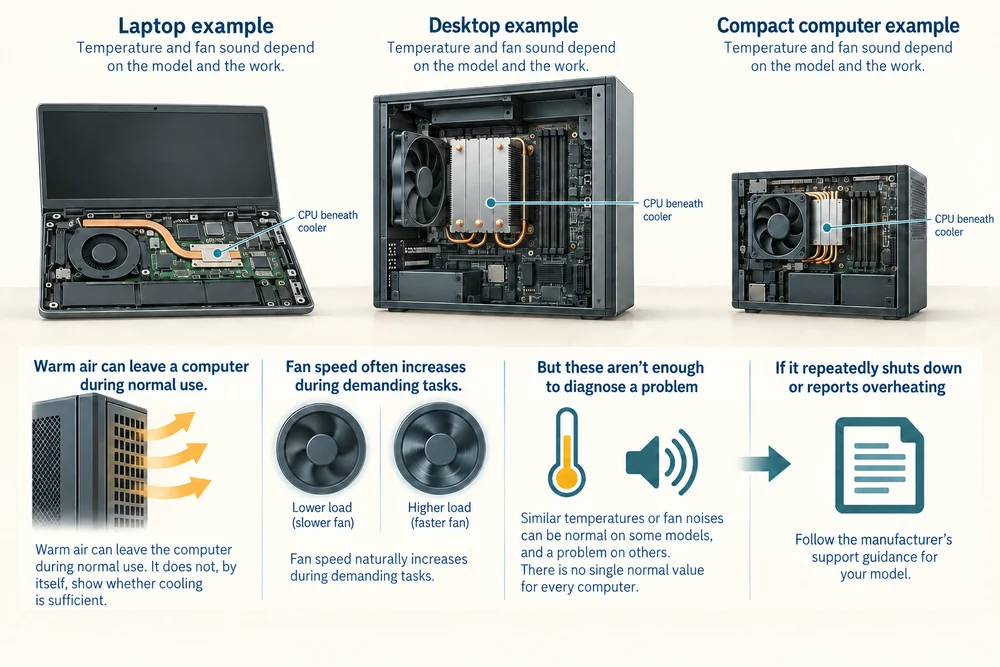
A temperature reading describes how warm something is at that moment. It does not tell you how much work the computer completed. The workload and surrounding air both matter when making sense of changing temperature and fan speed.

Check your understanding
Click Start 3 questions to begin a selection from this lesson’s ten questions. Read the guidance beside each question. After the first two correct answers, click Next question. When all three are correct, click Continue below. With a keyboard, press Tab to reach a button and Enter to activate it.
In guided learning, click Start 3 questions to receive a selection from this lesson. Click the circle beside an answer, then click Check answer. Read the feedback and try again if needed. Click Next question after each correct answer. Answer all 3 correctly to continue.
Returning to guided learning keeps the questions and answers in your current attempt.
Read all 10 questions and explanations
What happens to heat when a CPU cooler is working?
Answer: It moves away from the processor towards the surrounding air.
Yes. Cooling transfers heat into surrounding air continuously. A fan moves air rather than refrigerating it, and the cooler needs a route to release heat.
Why use many thin fins rather than one smooth metal surface on a heat sink?
Answer: The fins give heat more surface through which to reach the air.
Yes. Fins provide surface for heat transfer. They do not pump air; air passes between them, often moved by a fan.
Which part of the cooling process is the fan responsible for?
Answer: Moving surrounding air over the cooler’s fins.
Yes. The fan moves air. Metal and heat pipes carry heat through an air cooler; a pump circulates liquid in a liquid cooler.
In the common liquid-cooling loop shown, where does liquid go after picking up heat at the CPU block?
Answer: Towards the radiator through the cooler’s tubes.
Yes. The pump circulates liquid between the CPU block and radiator. The radiator gives the heat a route into surrounding air before the liquid returns.
Which step releases heat from a common liquid-cooling system into the room?
Answer: The radiator transfers heat into the air passing through it.
Yes. The radiator transfers heat from the circulating liquid to surrounding air, usually helped by fans.
What determines whether air cooling is suitable for a computer?
Answer: Whether the cooler can handle that system’s cooling needs.
Yes. An appropriate air cooler can handle the system’s needs. Multiple programs or cores do not by themselves require liquid cooling.
A laptop has a cooler inside. Why do its outside vents still matter?
Answer: They provide the route for air to enter and leave.
Yes. The cooler needs airflow through the computer. Vents provide that route; they do not directly control clock cycles or store heat.
Which arrangement best supports a laptop’s intended airflow?
Answer: A hard, flat surface with space around its vents.
Yes. Both the supporting surface and clear vents matter. Soft material can obstruct underside vents, and objects can block exhaust air.
A processor reaches a temperature limit. What does thermal throttling change?
Answer: Its processing speed, to reduce heat output.
Yes. Thermal throttling reduces processor speed to help control heat. Increasing fan speed is a separate cooling response.
A fan becomes louder while a demanding program runs. Which interpretation is reasonable from that alone?
Answer: It may be moving more air in response to extra heat.
Yes. Fan speed can increase normally with workload. Noise alone does not establish a fault or a particular temperature.
Connect the idea to your computer
These optional observations help connect the pictures with your own computer. You can finish the lesson without opening the case, changing a setting or buying a part.
- 1
From outside your computer, look for air vents. Keep the case closed and leave any cables in place.
- 2
Look at the space around those vents. If you use a laptop, notice whether its current surface is hard and flat or soft enough to cover openings.
- 3
During ordinary use, listen for any change in fan sound. Some devices have no fan, and a quiet fan may be difficult to hear. You do not need to run a demanding program to complete this observation.
If you do not have the specification sheet or cannot identify a part, use the lesson pictures instead. Every computer is different. This activity is about understanding, not fitting or replacing hardware.
Looking to build a computer or find one that suits your needs? Contact Basic Computing for help.
Look inside your computer
Explore hardware in 3D
Choose an internal component below. Click once on Open 3D model to load a model you can turn and inspect.
Meet the component
CPU cooler
A cooler moves heat away from the processor. A metal base and heat pipes carry heat to thin fins, while a fan moves air through them.
Choose a part
Click once on a named part above to learn what it does. When the 3D view is open, a bright yellow glow highlights it on the model.
These are simplified, representative designs. Details and proportions vary between real products. Separated parts are a teaching illustration, not instructions for taking a device apart.