Understand your home network
Understand your home network
Trace a device’s route through the home network.
You can explain why a working local connection does not prove internet access.
Your home network connects nearby devices. A router directs traffic between networks, and Wi-Fi or Ethernet connects devices locally. Provider equipment links the home to the outside service. Several jobs may be combined in one box, so counting boxes does not tell you how many jobs are happening.

Work through the useful checks
How this works
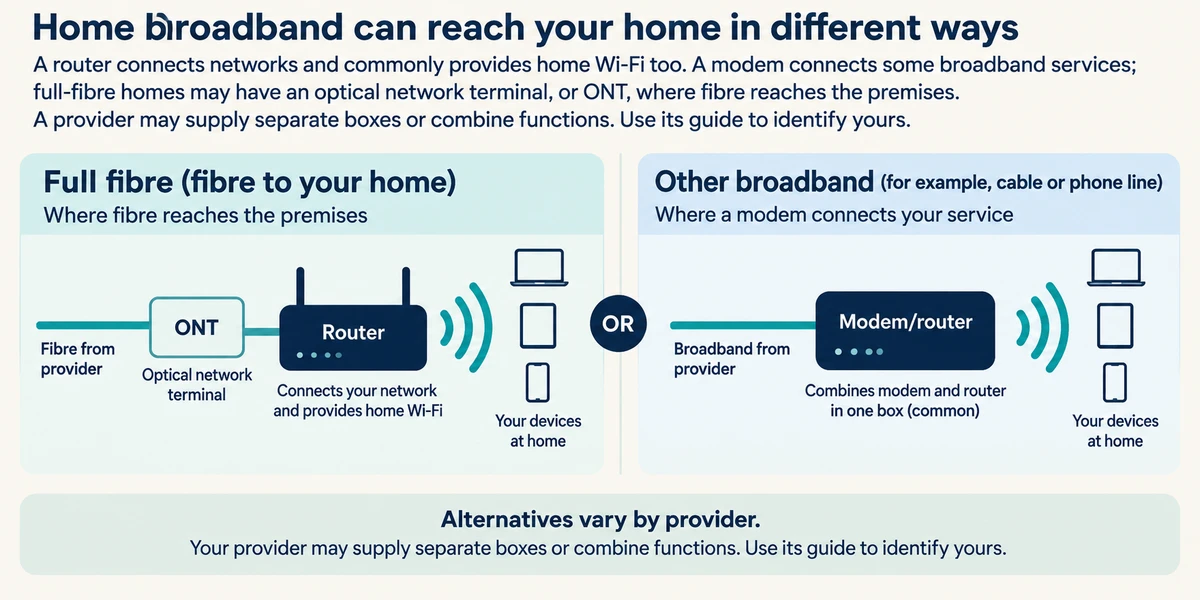
A router connects networks and commonly provides home Wi-Fi too. A modem connects some broadband services; full-fibre homes may have an optical network terminal, or ONT, where fibre reaches the premises. A provider may supply separate boxes or combine functions. Use its guide to identify yours.
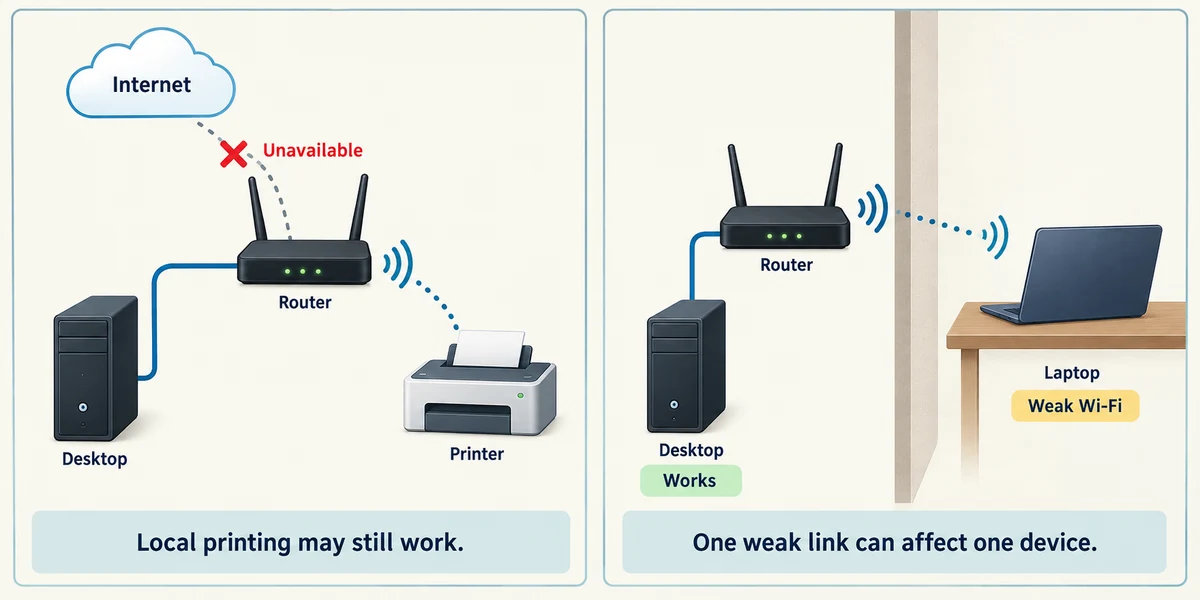
Ethernet is a wired network connection; Wi-Fi uses radio. A local printer may still work when the outside internet service fails. Conversely, one weak Wi-Fi link can affect a laptop while another wired device works.

An IP address helps network traffic reach a network connection on a device. A common home setup gives devices local addresses and shares a public IPv4 address towards the internet. IPv6 works differently, so this is a simplified common example, not a rule that every device has exactly one address.

Address settings are usually supplied automatically. Windows calls this DHCP. Do not type random addresses to improve speed. An IP address is not an account password or a permanent label for a person.
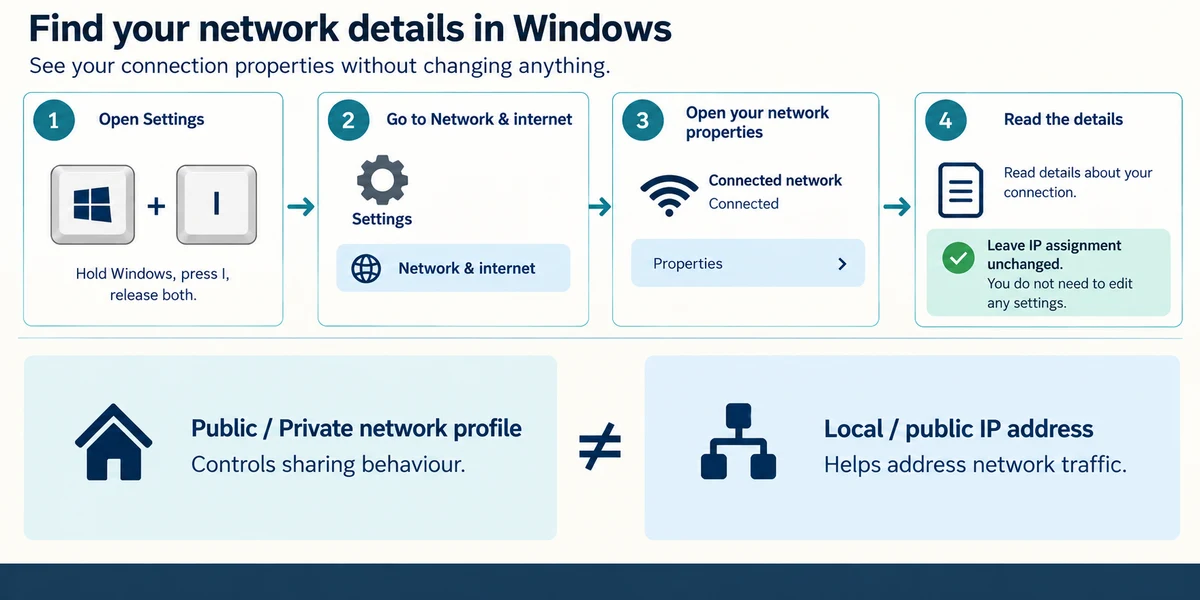
Hold the Windows key, press I once, then release both keys to open Settings. Click Network & internet, then the connected network’s Properties to read its connection details. Observe without changing IP assignment. The Windows Public or Private network profile controls sharing behaviour; it is not the same distinction as local and public IP addresses.
Explore the idea
A device connects to a router over Wi-Fi. The router connects onwards to the internet. A poor local signal can interrupt the first connection; an internet outage can interrupt the second while Wi-Fi remains connected. Ethernet can replace the local wireless link, but cannot repair an outage beyond the router.
The local printer works but several new websites fail. What remains possible?
The local network works while the outside service has a problem.
Check what you understand
In guided learning, click Start 3 questions to receive a selection from this lesson. Click the circle beside an answer, then click Check answer. Read the feedback and try again if needed. Click Next question after each correct answer. Answer all 3 correctly to continue.
Returning to guided learning keeps the questions and answers in your current attempt.
Read all 3 questions and explanations
A provider supplies one box doing several network jobs. What should you infer?
Answer: It may combine router, Wi-Fi and modem functions.
Equipment can combine roles. Its documentation is more useful than counting boxes.
Windows says IP assignment is Automatic. What does that usually mean?
Answer: The network supplies address settings rather than requiring you to type them.
Automatic addressing supplies suitable network settings. It does not give every network the same address or identify a person permanently.
The Windows network profile is called Public. What does that describe?
Answer: Windows sharing and discovery behaviour on this connection.
The profile controls Windows sharing behaviour. It is separate from network ownership and IP-address terminology.
Take this to your computer
- 1
Draw your computer, router and provider connection as three roles. Use the provider guide to identify whether one box combines roles, without unplugging cables.
- 2
Hold the Windows key, press I once, then release both keys to open Settings. Click Network & internet and the connected network’s Properties. Read the connection type, then close Settings using its top-right X. Do not share screenshots containing addresses or passwords publicly.
The lesson uses fictional examples. Optional checks on your computer can be observational. Settings and available features vary by model and Windows version.
Prefer a more personal, one-to-one lesson? Basic Computing can help. Explore our services.