Understand and open a file
Use a computer with a mouse and keyboard. This practice desktop is designed for clicking, right-clicking, dragging and typing with physical keys, rather than touchscreen use on a phone or tablet.
A file is something you have saved

You are going to open Packing list.txt and read what is inside.
You will learn what a file is and how an app shows its saved contents.
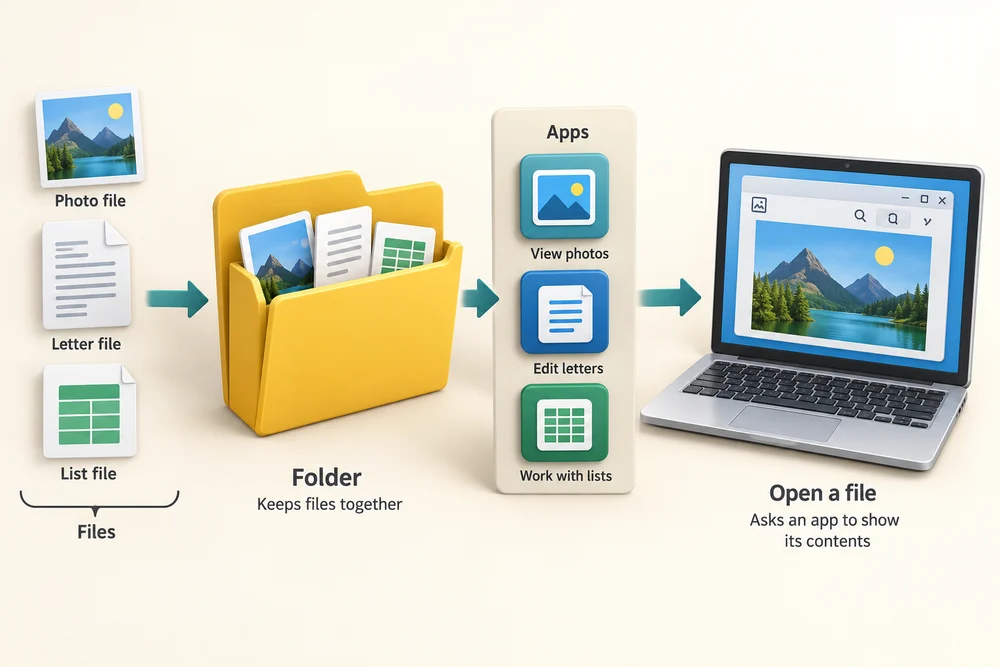
A file is a saved item, such as a photo, a letter or a list. A folder keeps files together. An app is a program that lets you view or work with them. Opening a file asks an app to show its contents.
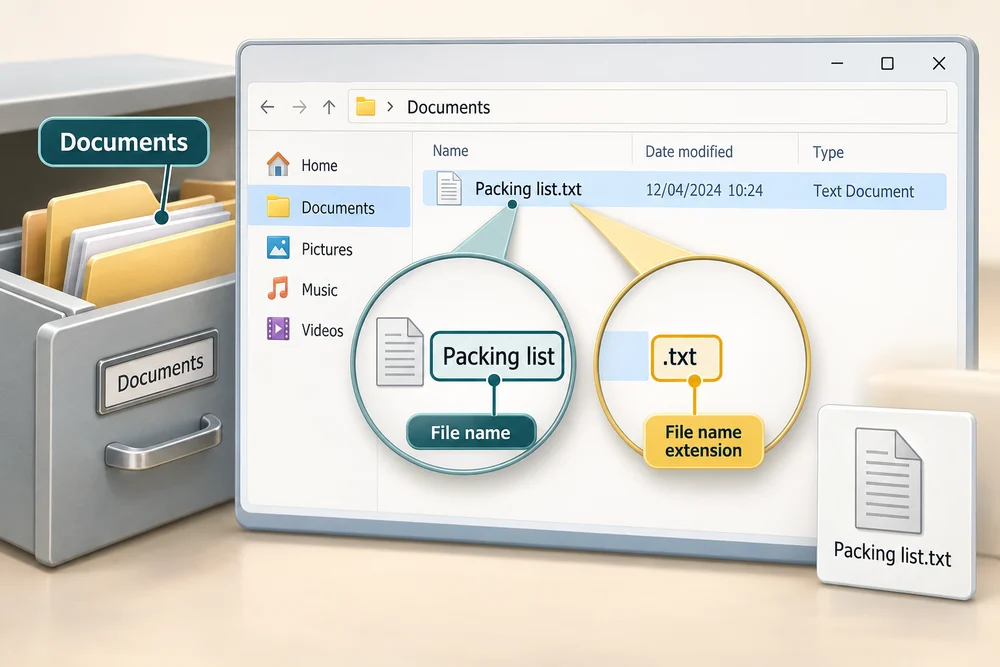
Our file is called Packing list.txt. The .txt ending identifies it as a text file, and Documents is its saved location. This ending is called a file name extension. Windows may hide extensions; our example shows them.
See the saved words appear
Packing list.txt is ready in Documents. Follow the instruction popup and open the file yourself on the practice desktop to read its saved words. Afterwards, Try it gives you a fresh desktop to practise independently. Click Check my work when you finish, or use the optional hints underneath.
Click Documents on the left, then double-click Packing list.txt: click its name twice quickly. You can also click it once and press Enter on your keyboard. Its saved words appear in Notes. Click the X at the top right of Notes to close it and return to File Explorer. The file remains in Documents.
Open the list yourself
Open Packing list.txt in Documents and read the words inside. This lesson has its own prepared file. The file opens in Notes inside the practice desktop. Read its words without editing them; files on your computer are unchanged.
Click Documents on the left. Double-click Packing list.txt, clicking its name twice quickly, to open it. You can also click it once to select it, then press Enter on your keyboard. Read the words in Notes. When you have finished, click the X at the top right of the Notes window to close it and see File Explorer again.
Where did the file go?
You open Packing list.txt, read it and close the app without editing. What should you find back in Documents?
The same file, with the same saved words.
Try this outside the practice desktop
You have practised inside this webpage. If you feel ready, you can repeat the skill in Windows on the same computer, outside the practice desktop. This is optional. The steps below use your actual apps and files, so use only disposable practice items. Files made in the webpage do not appear in Windows File Explorer.
The file is the saved item. Its folder is where you keep it, and an app shows what is inside. Different types of file may open in different apps.
- 1
Press the Windows logo key on your keyboard, type File Explorer and click the app in the results. Click Documents on the left. Click New at the top, then Folder. Type Learning Hub practice, or another unused name, and press Enter. This new folder will hold your practice files.
- 2
Press the Windows logo key, type Notepad and click the Notepad app in the results. Hold Ctrl, press N and release both keys to start a new blank note. Click its writing area and type a short practice list. Click File near the top left, then Save as.
- 3
In the Save as window, click Documents on the left and double-click your new practice folder. Click the File name box near the bottom. Hold Ctrl, press A, then release both keys to select the existing name. Type Packing list.txt and click Save. Once saved, click the X at the top right of the Notepad window to close it.
- 4
Click the yellow folder icon on the taskbar at the bottom of your screen to return to File Explorer. Click Documents on the left and double-click your practice folder. Look for Packing list. Windows may show or hide its .txt ending.
- 5
Double-click the file, clicking its name twice quickly, to open it. You can also click it once and press Enter. An app shows the words you saved. Its appearance may differ from our practice app.
- 6
Click the X at the top right of the app window to close it. Click the yellow folder icon on the taskbar to return to File Explorer if needed. Your practice folder still contains the saved file.
PC practice is optional. The webpage’s sample file is not added to your computer. Keep your disposable file for later lessons; your chosen folder is its real saved location.
Prefer a more personal, one-to-one lesson? Basic Computing can help. Explore our services.