Copy useful text from a picture
Copy useful text from a picture
Check a recognised reference against the source picture.
Extract a draft of pictured text and check it for mistakes.
Words in an image are part of a picture, so ordinary text selection may not work. Text recognition, also called OCR, estimates the letters and turns them into editable text. It is useful for a short quotation or reference number, but unclear print and similar characters can produce mistakes.

Make the choice that fits your task
How this works

Choose a clear, non-sensitive picture that you are allowed to use. Press Windows once, type Snipping Tool and click its app result. Make the pictured words visible behind Snipping Tool first. Click New, choose the rectangular capture if needed, then hold the left mouse button and drag around the pictured words before releasing.

In the captured image, click Text actions in the Snipping Tool toolbar. If the control is missing, check for a Snipping Tool update in Microsoft Store or use the official guidance for your version. Click Copy all text. For a smaller selection, point at its first word, hold the left mouse button, drag across the required words and release; hold Ctrl, press C and release to copy them.

Open a new blank note: press Windows, type Notepad and click it, then hold Ctrl and press N before releasing. Click the blank writing area and hold Ctrl, press V, then release to paste.
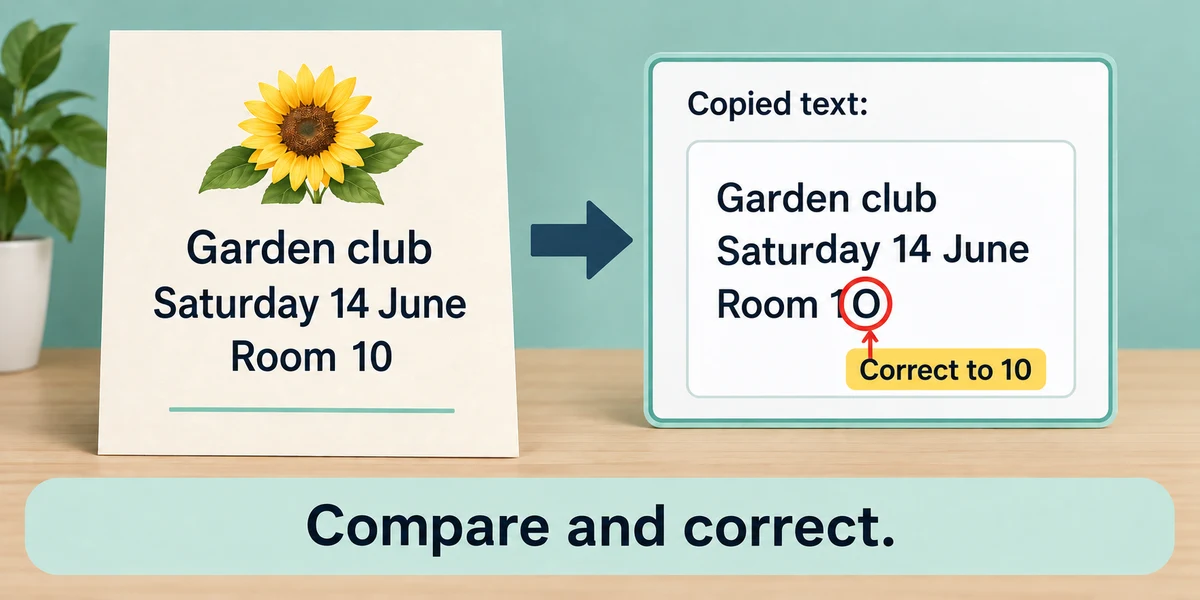
Compare the pasted result with the picture, especially names, dates and characters such as 0 and O or 1 and l. Correct errors before sharing or using the text. Recognition does not verify that a statement or link in the picture is trustworthy.

Only retain or share what you need. Text actions can also offer redaction, but always inspect the final image yourself before sharing private material. A missed detail can remain visible.
A scanned reference number looks like AB10, but the pasted result says ABIO. What should you do?
Compare it with the source and correct the characters
Check what you understand
In guided learning, click Start 3 questions to receive a selection from this lesson. Click the circle beside an answer, then click Check answer. Read the feedback and try again if needed. Click Next question after each correct answer. Answer all 3 correctly to continue.
Returning to guided learning keeps the questions and answers in your current attempt.
Read all 3 questions and explanations
Why can ordinary dragging fail to select individual words in a photograph?
Answer: The letters are picture pixels rather than editable text
OCR can estimate those pixels as characters.
OCR produces a website address from a poster. What has it established?
Answer: Only an estimated transcription of the visible address
It has not verified the destination or its owner.
When should you check extracted text against the original?
Answer: Before relying on or sharing it
Names and numbers can be changed by recognition errors.
Take this to your computer
- 1
Open a clear image of harmless sample text so its words are visible on screen. Press the Windows logo key, type Snipping Tool and click its app result. Choose Rectangle in the capture mode control near the top, then click New. Point at one corner of the words, hold the left mouse button, drag to the opposite corner and release.
- 2
In the captured image’s toolbar, click Text actions, then Copy all text. Press the Windows logo key, type Notepad and click its app result. Hold Ctrl, press N and release both keys for a new note. Click its writing area, hold Ctrl, press V and release both keys. Compare every word and number with the source before keeping the result.
The lesson examples do not change your computer. On your PC, read each confirmation before continuing; available controls can vary.
Prefer a more personal, one-to-one lesson? Basic Computing can help. Explore our services.